
Programming म्हणजे फक्त code लिहिणे नाही, निर्णय घेणे, गणना करणे, तुलना करणे आणि logic तयार करणे! हे सर्व काम Python Operators करतात. Arithmetic (+, -, *, //) पासून ते Bitwise (&, |, ^) पर्यंत, सर्व 7 types real-world उदाहरणांसह, Operator Precedence, Interview Q&A, आणि Practice Problems सह मराठीत!
रुपेश पवार
IT Professional 5+ वर्षांचा अनुभव
प्रकाशित
27 February २०२६
वाचण्याचा वेळ
15 मिनिटे
स्तर
Beginner
Table of Contents
Python Operators म्हणजे काय? | मराठीत सोपे स्पष्टीकरण
आपण शाळेत गणित शिकताना +, -, ×, ÷ हे symbols वापरतो. Python मध्ये देखील अशाच symbols चा वापर होतो — पण त्यांना Operators म्हणतात. Operators फक्त गणितापुरते नाहीत, ते तुलना करतात, decisions घेतात, memory तपासतात!
Operator म्हणजे काय?
Python Operator म्हणजे variables आणि values वर operations (गणना, तुलना, logical decisions) करण्यासाठी वापरले जाणारे symbols किंवा keywords. Operator ज्या values वर काम करतो त्यांना Operands म्हणतात.
उदाहरण: 10 + 5 = 15 — येथे + हा Operator आणि 10 व 5 हे Operands आहेत.
वास्तविक जीवनाशी तुलना:
| वास्तविक जीवन | Python Operator | उदाहरण |
|---|---|---|
| दुकानात किंमत मोजणे | Arithmetic (+, -, *) | total = qty * price |
| वय 18+ आहे का? | Comparison (>=) | वय >= 18 |
| वय 18+ आणि नागरिक? | Logical (and) | वय>=18 and नागरिक |
| Balance वाढवणे/कमी करणे | Assignment (+=, -=) | balance += 1000 |
| List मध्ये item आहे का? | Membership (in) | “आंबा” in फळे |
| दोन variables एकच object? | Identity (is) | a is None |
Python Operators चे 7 प्रकार – Types एका नजरेत
1. Arithmetic: गणना + – * / // % **
2. Comparison: तुलना == != > < >= <=
3. Logical: तार्किक and or not
4. Assignment: Value store = += -= *=
5. Bitwise: Binary & | ^ ~ << >>
6. Identity: Memory check is, is not.
7. Membership: Collection in, not in
1. Arithmetic Operators – गणना करणे
Arithmetic Operators म्हणजे गणितीय calculations साठी वापरले जाणारे operators. Calculator app, shopping bill, percentage, EMI calculation, सर्वत्र arithmetic operators वापरतात.
| Operator | नाव | उदाहरण | Output |
|---|---|---|---|
| + | बेरीज (Addition) | 10 + 5 | 15 |
| – | वजाबाकी (Subtraction) | 10 – 5 | 5 |
| * | गुणाकार (Multiplication) | 10 * 5 | 50 |
| / | भागाकार (Division) | 10 / 3 | 3.333… |
| // | पूर्ण भागाकार (Floor Division) | 10 // 3 | 3 |
| % | शिल्लक (Modulus) | 10 % 3 | 1 |
| ** | घात (Exponent) | 2 ** 8 | 256 |
Real-World उदाहरण – Shopping Bill Calculator
# Shopping Bill — सर्व arithmetic operators एकत्र
तांदूळ_किंमत = 60    # ₹60/kg
तांदूळ_kg = 5
डाळ_किंमत = 120   # ₹120/kg
डाळ_kg = 2

तांदूळ_total = तांदूळ_किंमत * तांदूळ_kg   # 300
डाळ_total = डाळ_किंमत * डाळ_kg         # 240
एकूण = तांदूळ_total + डाळ_total          # 540

discount_percent = 10
discount = एकूण * discount_percent / 100  # 54
final_bill = एकूण - discount              # 486

print(f"तांदूळ ({तांदूळ_kg}kg × ₹{तांदूळ_किंमत}): ₹{तांदूळ_total}")
print(f"डाळ   ({डाळ_kg}kg × ₹{डाळ_किंमत}):  ₹{डाळ_total}")
print(f"एकूण:                        ₹{एकूण}")
print(f"Discount ({discount_percent}%):            -₹{discount:.0f}")
print(f"Final Bill:                   ₹{final_bill:.0f}")
/ / आणि % — सर्वात उपयुक्त Operators
# // (Floor Division) — पूर्ण संख्या भाग
मिनिटे = 137
तास = मिनिटे // 60      # 2 तास
उरलेले_मिनिटे = मिनिटे % 60   # 17 मिनिटे
print(f"{मिनिटे} मिनिटे = {तास} तास {उरलेले_मिनिटे} मिनिटे")

# % (Modulus) — सम/विषम तपासणे
for n in [4, 7, 12, 15]:
    if n % 2 == 0:
        print(f"{n} → सम (Even)")
    else:
        print(f"{n} → विषम (Odd)")

# ** (Exponent) — Compound Interest
मुद्दल = 10000
दर = 0.08    # 8%
वर्षे = 5
amount = मुद्दल * (1 + दर) ** वर्षे
print(f"\n{वर्षे} वर्षांनंतर: ₹{amount:.2f}")
OUTPUT 137 मिनिटे = 2 तास 17 मिनिटे 4 → सम (Even) 7 → विषम (Odd) 12 → सम (Even) 15 → विषम (Odd) 5 वर्षांनंतर: ₹14693.28
2. Comparison Operators – तुलना करणे
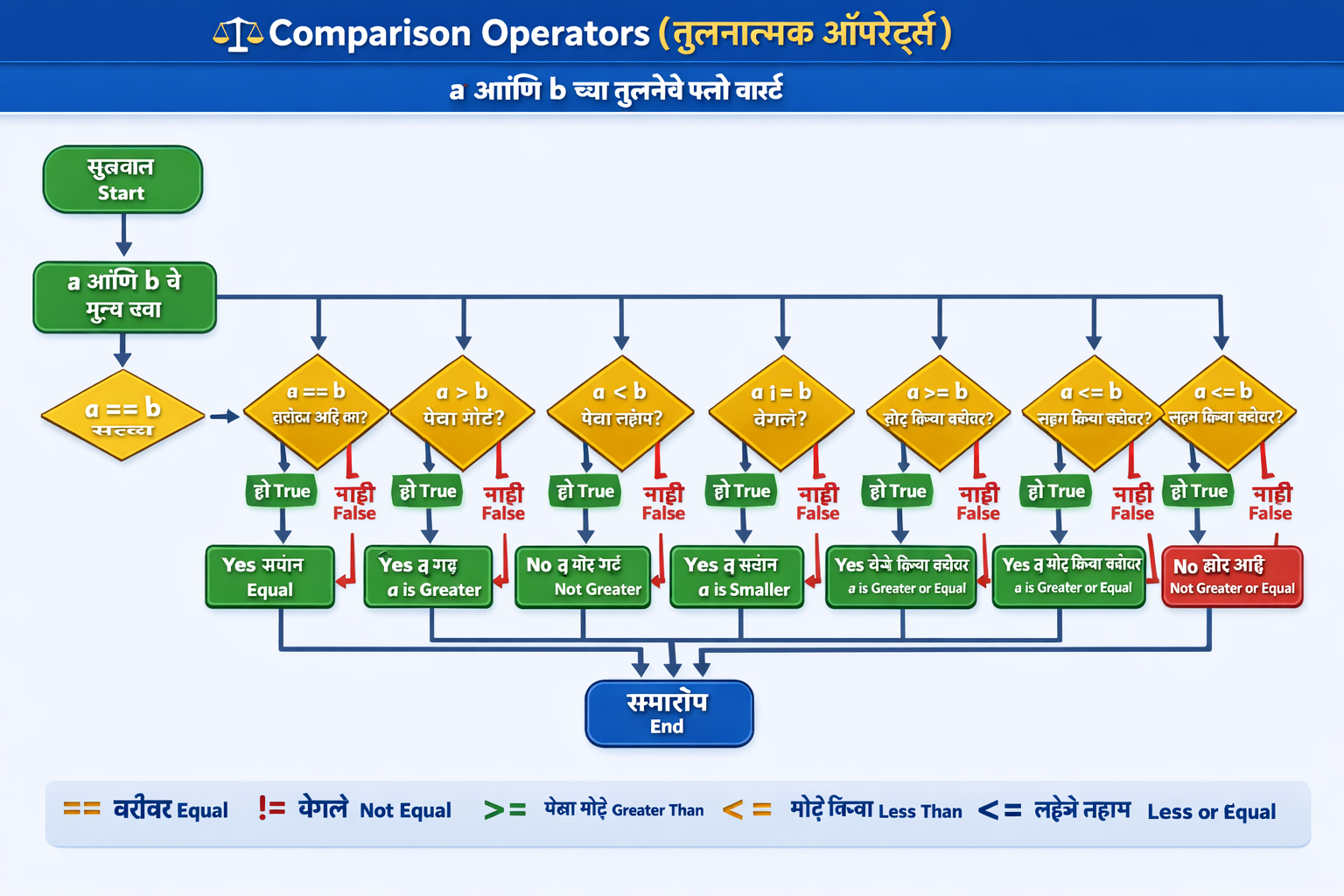
Comparison Operators दोन values तुलना करतात आणि नेहमी True किंवा False return करतात. Login validation, age check, exam result, price comparison, सर्वत्र वापरतात.
| Operator | अर्थ | उदाहरण | Result |
|---|---|---|---|
| == | बरोबर आहे का? | 5 == 5 | True |
| != | वेगळे आहे का? | 5 != 3 | True |
| > | पेक्षा मोठे | 10 > 5 | True |
| < | पेक्षा लहान | 3 < 10 | True |
| >= | मोठे किंवा बरोबर | 10 >= 10 | True |
| <= | लहान किंवा बरोबर | 5 <= 10 | True |
# Login System — Comparison Operators
saved_username = "admin"
saved_password = "lgrow@2026"

username = "admin"
password = "lgrow@2026"

if username == saved_username and password == saved_password:
    print("✓ Login Successful! Welcome!")
else:
    print("✗ Invalid credentials!")

# Grade comparison
marks = [("राहुल", 88), ("प्रिया", 95), ("अमित", 72)]
print("\nScholarship (85%+):")
for नाव, m in marks:
    symbol = "✓" if m >= 85 else "✗"
    print(f"  {symbol} {नाव}: {m}%")

# Chained comparison (Python विशेष)
वय = 25
print(f"\nवय 18 ते 60 मध्ये आहे: {18 <= वय <= 60}")   # True
OUTPUT ✓ Login Successful! Welcome! Scholarship (85%+): ✓ राहुल: 88% ✓ प्रिया: 95% ✗ अमित: 72% वय 18 ते 60 मध्ये आहे: True
3. Logical Operators – Multiple Conditions
Logical Operators अनेक conditions एकत्र combine करतात आणि एकच True/False result देतात. ATM withdrawal, loan eligibility, website access, जिथे एकापेक्षा जास्त conditions तपासायच्या असतात तिथे हे वापरतात.
# Loan Eligibility — and, or, not एकत्र
वय = 35
उत्पन्न = 45000
credit_score = 750
existing_loan = False

# and — सर्व अटी पूर्ण हव्यात
basic_eligible = (वय >= 21 and
                  उत्पन्न >= 25000 and
                  credit_score >= 700)

# not — existing loan नसणे जरुरी
no_loan_burden = not existing_loan

# or — high income किंवा excellent credit
premium = उत्पन्न >= 80000 or credit_score >= 800

print("=== Loan Application ===")
print(f"Basic Eligible:   {basic_eligible}")
print(f"No Loan Burden:   {no_loan_burden}")
print(f"Premium Customer: {premium}")

if basic_eligible and no_loan_burden:
    print("\n✓ Loan Approved!")
    if premium:
        print("  → Premium Rate: 7.5%")
    else:
        print("  → Standard Rate: 10.5%")
else:
    print("\n✗ Loan Not Approved")
OUTPUT === Loan Application === Basic Eligible: True No Loan Burden: True Premium Customer: False ✓ Loan Approved! → Standard Rate: 10.5%
4. Assignment Operators – Value Save करणे
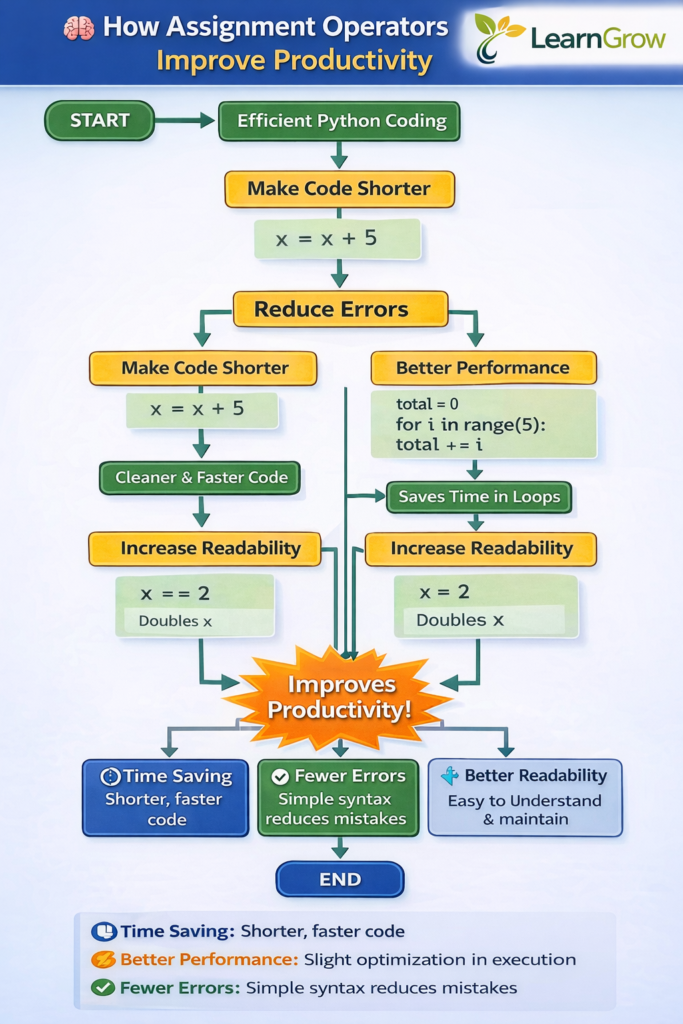
Assignment Operators variable मध्ये value store करतात किंवा update करतात. +=, -= सारखे shorthand operators code लहान आणि readable करतात — loop counters, bank balance, score tracking साठी खूप उपयुक्त.
| Operator | म्हणजे | उदाहरण | Same As |
|---|---|---|---|
| = | Value assign करा | x = 10 | — |
| += | जोडून assign करा | x += 5 | x = x + 5 |
| -= | वजा करून assign करा | x -= 5 | x = x – 5 |
| *= | गुणून assign करा | x *= 2 | x = x * 2 |
| /= | भागून assign करा | x /= 2 | x = x / 2 |
| //= | Floor divide assign | x //= 3 | x = x // 3 |
| %= | Modulo assign | x %= 3 | x = x % 3 |
| **= | Exponent assign | x **= 2 | x = x ** 2 |
# Bank Account Simulation
balance = 10000
print(f"Opening Balance: ₹{balance}")

balance += 5000   # Deposit
print(f"Deposit ₹5000:   ₹{balance}")

balance -= 2000   # Withdrawal
print(f"Withdraw ₹2000:  ₹{balance}")

balance *= 1.06   # 6% interest
print(f"6% Interest:     ₹{balance:.2f}")

balance //= 1     # round to rupees
print(f"Final Balance:   ₹{balance:.0f}")

# Score system in a game
score = 0
score += 100   # Level 1 complete
score += 150   # Level 2 complete
score *= 2     # Bonus multiplier
score -= 50    # Penalty
print(f"\nGame Score: {score}")
OUTPUT Opening Balance: ₹10000 Deposit ₹5000: ₹15000 Withdraw ₹2000: ₹13000 6% Interest: ₹13780.00 Final Balance: ₹13780 Game Score: 450
5. Bitwise Operators – Binary Operations
Bitwise Operators numbers चे binary representation (0 आणि 1) वर काम करतात. हे थोडे advanced आहेत, पण permissions system, flags, networking, cryptography मध्ये खूप वापरले जातात. Python beginners साठी हे नंतर शिकता येते.
| Operator | नाव | उदाहरण (a=5, b=3) | Output |
|---|---|---|---|
| & | AND | 5 & 3 → 101 & 011 | 1 (001) |
| | | OR | 5 | 3 → 101 | 011 | 7 (111) |
| ^ | XOR | 5 ^ 3 → 101 ^ 011 | 6 (110) |
| ~ | NOT (complement) | ~5 | -6 |
| << | Left Shift | 5 << 1 | 10 |
| >> | Right Shift | 5 >> 1 | 2 |
# Bitwise operators उदाहरण
a = 5   # binary: 101
b = 3   # binary: 011

print(f"a = {a} ({bin(a)})")
print(f"b = {b} ({bin(b)})")
print(f"a & b = {a & b}   (AND)")
print(f"a | b = {a | b}   (OR)")
print(f"a ^ b = {a ^ b}   (XOR)")
print(f"~a    = {~a}  (NOT)")
print(f"a<<1  = {a<<1}  (Left Shift × 2)")
print(f"a>>1  = {a>>1}   (Right Shift ÷ 2)")

# Practical: Left shift = × 2, Right shift = ÷ 2
print(f"\n16 << 2 = {16 << 2}  (16 × 4)")
print(f"32 >> 2 = {32 >> 2}   (32 ÷ 4)")
OUTPUT a = 5 (0b101) b = 3 (0b11) a & b = 1 (AND) a | b = 7 (OR) a ^ b = 6 (XOR) ~a = -6 (NOT) a<<1 = 10 (Left Shift × 2) a>>1 = 2 (Right Shift ÷ 2) 16 << 2 = 64 (16 × 4) 32 >> 2 = 8 (32 ÷ 4)
6. Identity Operators – Memory तपासणे
Identity Operators दोन variables एकाच memory location (object) ला point करतात का हे तपासतात. == value तपासतो, तर is identity (object) तपासतो, हा Interview मध्ये खूप विचारला जाणारा topic आहे!
# == vs is — महत्त्वाचा फरक
a = [1, 2, 3]
b = a          # b हे a चाच reference
c = [1, 2, 3]   # c हे वेगळे object

print("=== == operator (value comparison) ===")
print(f"a == b: {a == b}")  # True (same value)
print(f"a == c: {a == c}")  # True (same value)

print("\n=== is operator (identity/memory comparison) ===")
print(f"a is b: {a is b}")  # True (same object!)
print(f"a is c: {a is c}")  # False (different object)

print(f"\na id: {id(a)}")
print(f"b id: {id(b)}")   # a आणि b चा id एकच
print(f"c id: {id(c)}")   # c चा id वेगळा

# None तपासताना नेहमी 'is' वापरा
result = None
if result is None:        # ✓ Best practice
    print("\nResult अजून मिळाले नाही")
if result is not None:
    print("Result मिळाले!")
OUTPUT === == operator (value comparison) === a == b: True a == c: True === is operator (identity/memory comparison) === a is b: True a is c: False a id: 140234567890 b id: 140234567890 c id: 140234567920 Result अजून मिळाले नाही
7. Membership Operators – Collection मध्ये शोधणे
Membership Operators एखादी value sequence (list, tuple, string, dict, set) मध्ये आहे का हे तपासतात. Permission system, search, validation – सर्वत्र उपयुक्त आहेत.
# in — value आहे का?
# not in — value नाही का?

# 1. List मध्ये
admin_users = ["rupesh", "priya", "rahul"]
user = "priya"
if user in admin_users:
    print(f"✓ {user} — Admin Access")
else:
    print(f"✗ {user} — No Access")

# 2. String मध्ये
email = "rupesh@gmail.com"
if "@" in email and "." in email:
    print(f"✓ Valid Email: {email}")

# 3. Dictionary मध्ये (keys तपासतो)
student = {"नाव": "राहुल", "वय": 20, "grade": "A"}
print(f"'grade' key आहे: {'grade' in student}")
print(f"'marks' key नाही: {'marks' not in student}")

# 4. Blocked words filter
blocked = {"spam", "fake", "scam"}
message = "This is a fake offer!"
words = message.lower().split()

if any(w in blocked for w in words):
    print("\n⚠ Spam detected! Message blocked.")
else:
    print("\n✓ Message sent successfully.")
✓ priya — Admin Access ✓ Valid Email: rupesh@gmail.com 'grade' key आहे: True 'marks' key नाही: True ⚠ Spam detected! Message blocked.
Operator Precedence – कोणता आधी चालतो?
जसे गणितात BODMAS rule असतो (Brackets, Orders, Division, Multiplication, Addition, Subtraction), तसेच Python मध्ये Operator Precedence असतो. चुकीचा precedence = चुकीचा result!
| Priority | Operator | नाव |
|---|---|---|
| 1 (सर्वोच्च) | ( ) | Parentheses — कंस |
| 2 | ** | Exponent — घात |
| 3 | ~ + – | Unary operators |
| 4 | * / // % | Multiplication, Division |
| 5 | + – | Addition, Subtraction |
| 6 | << >> | Bitwise Shift |
| 7 | & | ^ | Bitwise AND, OR, XOR |
| 8 | == != > < >= <= | Comparison |
| 9 | is, in, not in | Identity, Membership |
| 10 (सर्वात कमी) | not, and, or | Logical |
# Precedence चुकल्यास चुकीचे results येतात!
print(2 + 3 * 4)       # 14, not 20! (* आधी चालतो)
print((2 + 3) * 4)     # 20 (कंस आधी)

print(2 ** 3 ** 2)      # 512 (right to left: 2^9)
print((2 ** 3) ** 2)    # 64 (left to right: 8^2)

# Real formula — EMI calculation
P = 500000   # Principal
r = 0.01     # Monthly rate (12% / 12)
n = 60       # 5 years

# EMI = P × r × (1+r)^n / ((1+r)^n - 1)
EMI = P * r * (1 + r)**n / ((1 + r)**n - 1)
print(f"\nEMI: ₹{EMI:.2f}/month")
14 20 512 64 EMI: ₹11122.22/month
Real-World Project – सर्व Operators एकत्र
आता शिकलेले सर्व 7 operator types एकत्र वापरून एक Employee Salary Calculator बनवूया:
# सर्व 7 Operator Types एकत्र
employees = [
    {"नाव": "राहुल पाटील", "base": 35000, "years": 5, "dept": "IT"},
    {"नाव": "प्रिया शर्मा", "base": 42000, "years": 8, "dept": "HR"},
    {"नाव": "अमित देशमुख", "base": 28000, "years": 2, "dept": "Sales"},
]

senior_depts = {"IT", "Finance"}  # set — membership check
total_payroll = 0

print(f"{'='*55}")
print(f"     Employee Salary Report")
print(f"{'='*55}")

for emp in employees:
    base = emp["base"]          # Assignment
    years = emp["years"]

    # Arithmetic — HRA, DA, Bonus
    hra = base * 0.20            # 20% HRA
    da = base * 0.10             # 10% DA

    # Comparison + Logical — सीनियर bonus
    senior_bonus = base * 0.15 if (years >= 5 and emp["dept"] in senior_depts) else base * 0.05

    gross = base + hra + da + senior_bonus  # Arithmetic

    # Tax — 20% if gross > 50000
    tax = gross * 0.20 if gross > 50000 else gross * 0.10
    net = gross - tax

    total_payroll += net          # Assignment +=

    # Membership — Senior check
    is_senior = emp["dept"] in senior_depts and years >= 5
    tag = "⭐ Senior" if is_senior else "Regular"

    print(f"\n{emp['नाव']} ({tag})")
    print(f"  Basic: ₹{base:,} | HRA: ₹{hra:,.0f} | DA: ₹{da:,.0f}")
    print(f"  Gross: ₹{gross:,.0f} | Tax: ₹{tax:,.0f}")
    print(f"  Net Salary: ₹{net:,.0f}")

print(f"\n{'='*55}")
print(f"Total Monthly Payroll: ₹{total_payroll:,.0f}")
========================================================
Employee Salary Report
========================================================
राहुल पाटील (⭐ Senior)
Basic: ₹35,000 | HRA: ₹7,000 | DA: ₹3,500
Gross: ₹50,750 | Tax: ₹5,075
Net Salary: ₹45,675
प्रिया शर्मा (Regular)
Basic: ₹42,000 | HRA: ₹8,400 | DA: ₹4,200
Gross: ₹56,700 | Tax: ₹11,340
Net Salary: ₹45,360
अमित देशमुख (Regular)
Basic: ₹28,000 | HRA: ₹5,600 | DA: ₹2,800
Gross: ₹37,800 | Tax: ₹3,780
Net Salary: ₹34,020
========================================================
Total Monthly Payroll: ₹1,25,055Beginners च्या सामान्य चुका
1. = आणि == गोंधळ
if x = 5 → SyntaxError! Assignment साठी =, Comparison साठी ==. Condition मध्ये नेहमी == वापरा.
2. is vs == गोंधळ
is object identity तपासतो, == value तपासतो. None, True, False तपासताना is वापरा. Numbers/Strings साठी == वापरा.
3. / आणि // गोंधळ
10 / 3 → 3.333 (float), 10 // 3 → 3 (int). पूर्ण संख्या हवी असेल तर // वापरा. Loop counter, index साठी // जास्त योग्य.
4. Operator Precedence विसरणे
2 + 3 * 4 = 14, 20 नाही! Complex expressions मध्ये नेहमी ( ) कंस वापरा — code readable होतो आणि precedence error टळतो.
5. String + Number
“वय: ” + 25 → TypeError! String आणि Number directly जोडता येत नाहीत. str(25) करा किंवा f-string वापरा: f”वय: {25}”
Best Practice
Complex conditions मध्ये कंस वापरा: (a > 0) and (b > 0). not in वापरा not x in ऐवजी. None check साठी नेहमी is None.
Practice Problems – स्वतः सोडवा
1. EMI Calculator
Arithmetic operators वापरून EMI calculator बनवा. User कडून Loan Amount, Interest Rate (%), आणि Duration (months) घ्या. Formula: EMI = P × r × (1+r)^n / ((1+r)^n – 1). Comparison वापरून “High EMI” warning द्या जर EMI income च्या 40%+ असेल.
2. Password Strength Checker
Membership operators वापरून password तपासा: Uppercase letters आहेत का? Lowercase आहेत का? Digits आहेत का? Special characters (!@#$) आहेत का? Comparison operators वापरून length check करा. Logical operators वापरून “Weak/Medium/Strong” सांगा.
3. Cricket Score Tracker
Assignment operators वापरून cricket match tracker बनवा. runs +=, wickets += करत राहा. Comparison + Logical operators वापरून “innings over” (10 wickets or 50 overs) detect करा. // operator वापरून overs आणि balls calculate करा.
4. Operator Precedence Quiz
खालील expressions manually calculate करा, मग Python मध्ये verify करा: (1) 2 + 3 ** 2 * 4, (2) 10 // 3 + 10 % 3, (3) True and False or not False, (4) 5 > 3 and 10 != 10 or 7 >= 7
Why You Should Trust This Article?
मी Python programming शिकवण्याचा आणि beginners ना practical examples देण्याचा अनुभव असल्यामुळे हा लेख खास Marathi learners साठी सोप्या भाषेत तयार केला आहे.
- Real examples
- Simple Marathi explanations
- Practical use cases
- Interview clarity
हे सर्व दिले आहे.
-> हा लेख खास Marathi learners साठी तयार केलेला आहे.
Python Operators का महत्वाचे आहेत?
जर operators समजले नाहीत तर:
- Conditions लिहिता येत नाहीत
- Calculations करता येत नाहीत
- Logic develop होत नाही
-> म्हणजे programming strong होत नाही.
Python Operator – सामान्य प्रश्न (FAQ)
Q1. == आणि is मध्ये काय फरक आहे?
Ans: == Value equality तपासतो — दोन variables ची value समान आहे का.
[1,2] == [1,2] → True. is Identity तपासतो — दोन variables एकाच memory object ला point करतात का. a = [1,2]; b = [1,2]; a is b → False (different objects). हा Interview मध्ये खूप विचारला जाणारा प्रश्न आहे. Rule: None, True, False तपासताना नेहमी is वापरा.
Q2. / आणि // मध्ये काय फरक आहे?
Ans: / Regular division — नेहमी float result देतो.
10 / 4 → 2.5, 10 / 5 → 2.0 (float)
// Floor division — पूर्ण संख्या result देतो, decimal cut होतो.
10 // 4 → 2, 10 // 3 → 3
Rule: Index, loop counter, टाइमिंगमध्ये calculate करताना // वापरा.
Price, percentage साठी / वापरा.
Q3. % (Modulo) Operator कशासाठी वापरतात?
Ans: % operator भागाकारानंतर उरलेली शिल्लक (remainder) देतो.
याचे 5 मुख्य uses:
(1) सम/विषम तपासणे (n % 2 == 0)
(2) value मर्यादित ठेवणे (convert करणे)
(3) Circular sequence साठी (index % length)
(4) Leap year check (year % 4 == 0)
(5) Last N digits मिळवणे
Programming मध्ये % हा सर्वात जास्त वापरला जाणारा arithmetic operator आहे.
Q4. Bitwise Operators कोणाला शिकायचे?
Ans: Bitwise Operators Beginners साठी optional आहेत — आधी इतर 6 types नीट शिका.
पण जर तुम्हाला System Programming, Networking, Cryptography, Game Development, किंवा Competitive Programming मध्ये interest असेल तर Bitwise जरूर शिका.
Interview मध्ये Senior Developer positions साठी Bitwise विचारतात.
Left shift (<<) म्हणजे × 2,
Right shift (>>) म्हणजे ÷ 2 — shortcut समजा.
Q5. Operator Precedence का महत्त्व आहे?
Ans: Operator Precedence चुकल्यास calculations चुकीचा होतो.
2 + 3 * 4 = 14 (multiplication first), 20 नाही.
Complex formulas — EMI, compound interest, physics calculations — मध्ये precedence चुकीचा तर answer पूर्णपणे चुकीचा येतो.
Rule: Doubt असेल तेव्हा कंस () वापरा — कंस नेहमी आधी calculate होतात.
Code readable राहतो आणि precedence error टळतो
Q6. Python Operators Interview मध्ये काय विचारतात?
Ans: Interview मध्ये या topics ची तयारी करा:
(1) == vs is फरक
(2) / vs // फरक
(3) and/or short-circuit evaluation
(4) Operator precedence questions जसं 2 + 3 ** 2 = ?
(5) Membership operators चे different data types वर use
(6) += vs = + फरक आणि performance
(7) Walrus operator := (Python 3.8+)
(8) Bitwise operators चे practical uses
MCQ साठी ऑनलाइन Python MCQ page visit करा.
पुढे काय शिकाल?