रुपेश पवार
IT Professional 5+ वर्षांचा अनुभव
प्रकाशित
3 March २०२६
वाचण्याचा वेळ
14 मिनिटे
स्तर
Beginner
Python Keywords म्हणजे language चे “आधीपासून ठरलेले special commands” जसे मराठीत “आणि”, “किंवा”, “जर” हे शब्द विशेष अर्थ देतात, तसेच Python मध्ये if, for, while, def हे keywords विशेष अर्थ देतात. या ब्लॉगमध्ये सर्व 35 keywords 6 categories मध्ये, प्रत्येकाचा अर्थ, उदाहरण आणि real-world use मराठीत शिका!
Table of Contents
Python Keywords म्हणजे काय? | सोप्या भाषेत
जेव्हा आपण मराठीत बोलतो तेव्हा काही शब्द विशेष अर्थाने वापरले जातात जसे “जर” म्हणजे एखादी अट आहे, “किंवा” म्हणजे दोन पर्याय आहेत. हे शब्द इतर कोणत्या अर्थाने वापरता येत नाहीत. Python मध्ये Keywords देखील असेच काम करतात.
Keyword म्हणजे काय?
Python Keywords म्हणजे language मध्ये आधीपासून ठरलेले reserved (आरक्षित) शब्द जे program चा structure, logic आणि flow define करतात. हे शब्द variable, function किंवा class चे नाव म्हणून वापरता येत नाहीत Python त्यांचा वेगळा अर्थ लावतो.
Keywords कसे पाहाल?
import keyword  # सर्व Python keywords ची list मिळवण्यासाठी module

# सर्व keywords ची list print करा
print(keyword.kwlist)

# एकूण किती keywords आहेत ते print करा
print(f"एकूण Keywords: {len(keyword.kwlist)}")

# एखादा शब्द keyword आहे का ते तपासा
print(keyword.iskeyword("for"))     # True (कारण 'for' हा keyword आहे)
print(keyword.iskeyword("rupesh"))  # False (कारण 'rupesh' हा keyword नाही)
OUTPUT ['False', 'None', 'True', 'and', 'as', 'assert', 'async', 'await', 'break', 'class', 'continue', 'def', 'del', 'elif', 'else', 'except', 'finally', 'for', 'from', 'global', 'if', 'import', 'in', 'is', 'lambda', 'nonlocal', 'not', 'or', 'pass', 'raise', 'return', 'try', 'while', 'with', 'yield'] एकूण Keywords: 35 True False
⚠ Keywords Variable म्हणून वापरता येत नाहीत!
if = 10 → SyntaxError!
for = “loop” → SyntaxError!
Keywords नेहमी lowercase असतात (True, False, None सोडून). Python case-
sensitive आहे — IF हे keyword नाही, if आहे.
सर्व 35 Keywords – 6 Categories मध्ये
1. Control Flow Keywords (8)
if, elif, else, for, while, break, continue, pass
2. Logical Keywords (3)
and, or, not
3. Function & Class Keywords (5)
def, return, class, lambda, yield
4. Error Handling Keywords (5)
try, except, else, finally, raise
5. Value & Type Keywords (5)
True, False, None, in, is
6. Import & Scope Keywords (9)
import, from, as, global, nonlocal, del, with, assert, async
1. Control Flow Keywords – Program चा प्रवाह
Control Flow Keywords हे program कोणता code कधी चालवायचा हे ठरवतात. जसे traffic signal गाड्यांचा प्रवाह नियंत्रित करतो, तसेच हे keywords code चा प्रवाह नियंत्रित करतात.
| Keyword | मराठी अर्थ | वापर |
|---|---|---|
| if | जर | अट खरी असेल तर code चालवतो |
| elif | अन्यथा जर | दुसरी अट तपासतो (else if) |
| else | अन्यथा | सर्व अटी चुकल्या तर |
| for | प्रत्येकासाठी | sequence वर iterate करतो |
| while | जोपर्यंत | condition True असेपर्यंत चालतो |
| break | थांबा | loop तात्काळ बंद करतो |
| continue | पुढे जा | current iteration skip करतो |
| pass | काहीही नाही | रिकामा block placeholder |
if / elif / else — निर्णय घेणे
# परीक्षेचा निकाल — if/elif/else
marks = 75

if marks >= 90:
    print("Grade A+ — Outstanding!")
elif marks >= 75:
    print("Grade A — Excellent!")
elif marks >= 60:
    print("Grade B — Good")
elif marks >= 35:
    print("Grade C — Pass")
else:
    print("Grade F — Fail. पुन्हा प्रयत्न करा!")
Grade A — Excellent!
for / break / continue – Loop नियंत्रण
# for loop + break + continue एकत्र
संख्या = [1, 2, 3, 4, 5, 6, 7, 8, 9, 10]

print("सम संख्या (5 पर्यंत):")
for n in संख्या:
    if n > 6:
        break       # 6 नंतर थांबा
    if n % 2 != 0:
        continue    # विषम skip करा
    print(n, end=" ")
सम संख्या (5 पर्यंत): 2 4 6
While – Condition-based Loop
# Countdown Timer
वेळ = 5
print("Launch Countdown:")

while वेळ > 0:
    print(f"  {वेळ}...")
    वेळ -= 1

print("Launch!")
Launch Countdown: 5... 4... 3... 2... 1... Launch!
2. Logical Keywords – तार्किक निर्णय
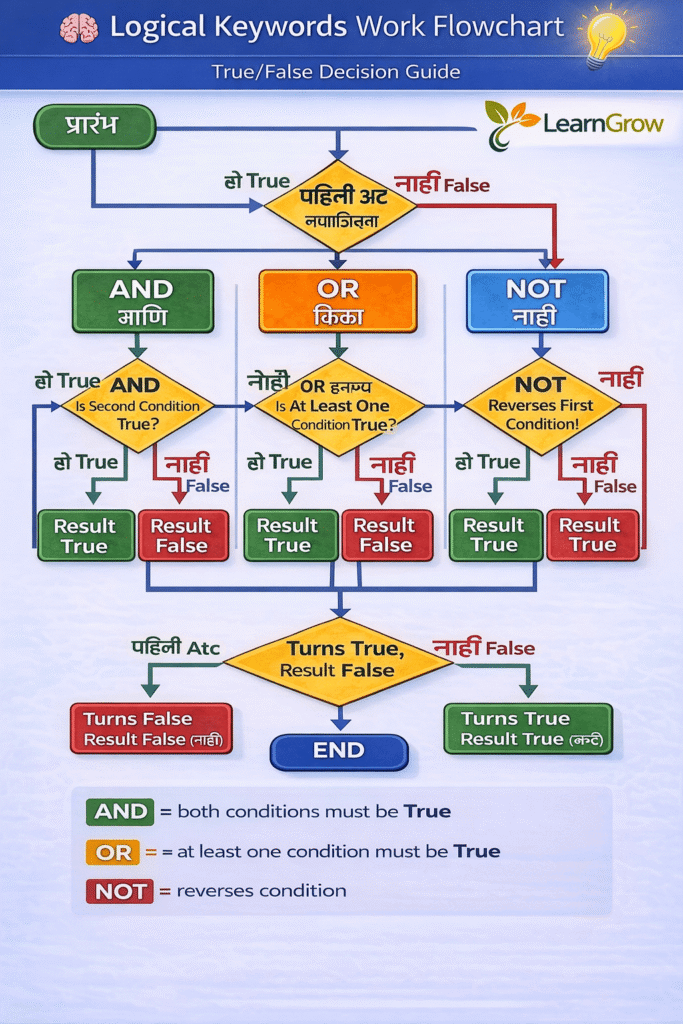
Logical Keywords म्हणजे and, or, आणि not. हे दोन किंवा जास्त conditions एकत्र करून एकच True/False result देतात. गणितातील AND gate, OR gate सारखेच हे काम करतात.
| Keyword | अर्थ | True कधी? | उदाहरण |
|---|---|---|---|
| and | आणि | दोन्ही True असतील तरच | वय>=18 and नागरिक==True |
| or | किंवा | एक जरी True असेल तर | cash>0 or card==True |
| not | नाही | condition उलटते | not is_banned |
# and — दोन्ही अटी True हव्यात
वय = 22
नागरिक = True

if वय >= 18 and नागरिक:
    print("✓ मतदान करता येईल!")

# or — एक अट True असली तरी चालते
upi = False
card = True
cash = 0

if upi or card or cash > 0:
    print("✓ Payment होऊ शकते")

# not — condition उलटवतो
banned = False
if not banned:
    print("✓ User access दिला")

# Truth Table — and
print(True  and True)   # True
print(True  and False)  # False
print(False and True)   # False
print(False and False)  # False
✓ मतदान करता येईल! ✓ Payment होऊ शकते ✓ User access दिला True False False False
3. Function & Class Keywords
Functions आणि Classes बनवण्यासाठी या keywords चा वापर होतो. def म्हणजे “define” — नवी function बनवतो. class म्हणजे object template बनवतो. return म्हणजे function मधून value परत देतो.
def / return — Function बनवणे
# def — function define करतो
def नमस्कार(नाव):
    # return — value परत देतो
    return f"नमस्कार, {नाव}! lgrow.in वर स्वागत आहे."

# function call करा
message = नमस्कार("राहुल")
print(message)

# Multiple return values
def marks_analysis(marks_list):
    एकूण = sum(marks_list)
    सरासरी = एकूण / len(marks_list)
    सर्वोच्च = max(marks_list)
    return एकूण, सरासरी, सर्वोच्च  # tuple म्हणून return

marks = [85, 92, 78, 90, 88]
एकूण, सरासरी, सर्वोच्च = marks_analysis(marks)
print(f"एकूण: {एकूण}, सरासरी: {सरासरी:.1f}%, सर्वोच्च: {सर्वोच्च}")
नमस्कार, राहुल! lgrow.in वर स्वागत आहे. एकूण: 433, सरासरी: 86.6%, सर्वोच्च: 92
class – Object Template बनवणे
# class — Object Oriented Programming
class विद्यार्थी:
    def __init__(self, नाव, वय, marks):
        self.नाव = नाव
        self.वय = वय
        self.marks = marks

    def परिचय(self):
        return f"नाव: {self.नाव} | वय: {self.वय} | Marks: {self.marks}"

    def grade(self):
        if self.marks >= 85:
            return "A"
        elif self.marks >= 70:
            return "B"
        else:
            return "C"

# Object बनवा
s1 = विद्यार्थी("प्रिया", 20, 88)
s2 = विद्यार्थी("राहुल", 21, 74)

print(s1.परिचय(), f"| Grade: {s1.grade()}")
print(s2.परिचय(), f"| Grade: {s2.grade()}")
नाव: प्रिया | वय: 20 | Marks: 88 | Grade: A नाव: राहुल | वय: 21 | Marks: 74 | Grade: B
lambda – एकाच ओळीत Function
# lambda — anonymous (नावाशिवाय) function
# Regular function
def square(x):
    return x ** 2

# Lambda equivalent (एकाच ओळीत)
square = lambda x: x ** 2
print(square(5))   # 25

# List sort करायला lambda वापरा
विद्यार्थी = [("राहुल", 85), ("प्रिया", 92), ("अमित", 78)]
sorted_list = sorted(विद्यार्थी, key=lambda x: x[1], reverse=True)
print(sorted_list)
25
[('प्रिया', 92), ('राहुल', 85), ('अमित', 78)]4. Error Handling Keywords – Crash टाळा
Program चालताना कधीकधी errors येतात — जसे user ने चुकीचे input दिले, file नाही, 0 ने भाग इ. या errors मुळे program crash होऊ नये म्हणून try-except वापरतो. हे म्हणजे “प्रयत्न कर, चुकलेस तर handle कर.”
| Keyword | मराठी अर्थ | वापर |
|---|---|---|
| try | प्रयत्न करा | Error येऊ शकेल असा code इथे ठेवतो |
| except | Exception पकडा | Error आल्यास काय करायचे ते सांगतो |
| else | Error नाही तर | try यशस्वी झाल्यावर चालतो |
| finally | शेवटी नेहमी | Error आली किंवा नाही — नेहमी चालतो |
| raise | Error निर्माण करा | स्वतः custom error raise करतो |
# try / except / else / finally — संपूर्ण उदाहरण
def भागाकार(a, b):
    try:
        result = a / b          # Error येऊ शकतो (÷0)
    except ZeroDivisionError:
        print("❌ 0 ने भाग देता येत नाही!")
        return None
    except TypeError:
        print("❌ फक्त संख्या द्या!")
        return None
    else:
        print(f"✓ उत्तर: {result:.2f}")  # यशस्वी झाल्यावर
        return result
    finally:
        print("-- Calculation पूर्ण --")  # नेहमी चालतो

भागाकार(10, 2)
print()
भागाकार(10, 0)
✓ उत्तर: 5.00 -- Calculation पूर्ण -- ❌ 0 ने भाग देता येत नाही! -- Calculation पूर्ण --
raise – Custom Error बनवणे
# raise — स्वतः error निर्माण करा
def वय_तपासा(वय):
    if not isinstance(वय, int):
        raise TypeError("वय हे integer असणे जरुरी आहे!")
    if वय < 0:
        raise ValueError("वय negative असू शकत नाही!")
    if वय < 18:
        raise ValueError(f"❌ वय {वय} — 18+ असणे जरुरी आहे!")
    print(f"✓ नोंदणी यशस्वी! वय: {वय}")

try:
    वय_तपासा(16)
except ValueError as e:
    print(f"Error: {e}")
Error: ❌ वय 16 — 18+ असणे जरुरी आहे!
5. Value & Type Keywords
True, False, None, in, आणि is, हे keywords values represent करतात किंवा values तपासतात.
# True / False — Boolean values
is_active = True
is_admin = False
print(type(True))   # <class 'bool'>

# None — "काहीच नाही" किंवा "रिकामे" दर्शवतो
result = None
if result is None:
    print("अजून result मिळाले नाही")

# in — sequence मध्ये आहे का ते तपासतो
फळे = ["आंबा", "केळे", "संत्रा"]
print("आंबा" in फळे)    # True
print("पेरू" not in फळे) # True
print("P" in "Python")    # True

# is — दोन variables एकाच object ला point करतात का?
a = [1, 2, 3]
b = a        # b हे a चाच reference आहे
c = [1, 2, 3]  # c हे वेगळे object आहे

print(a is b)   # True (same object)
print(a is c)   # False (different object)
print(a == c)   # True (same value)
<class 'bool'> अजून result मिळाले नाही True True True True False True
6. Import & Scope Keywords
या keywords चा वापर modules import करणे, variables चा scope ठरवणे, आणि files/connections handle करण्यासाठी होतो.
# import — module वापरायला
import math
print(math.sqrt(144))   # 12.0

# from...import — specific function import
from math import pi, factorial
print(f"π = {pi:.5f}")          # 3.14159
print(f"5! = {factorial(5)}")   # 120

# as — alias (टोपण नाव) देणे
import datetime as dt
आज = dt.date.today()
print(f"आजची तारीख: {आज}")

# global — function च्या बाहेरचा variable वापरणे
count = 0
def वाढवा():
    global count
    count += 1
वाढवा()
वाढवा()
print(f"Count: {count}")   # 2

# del — variable किंवा list item delete करा
नाव = "राहुल"
del नाव
# print(नाव)  → NameError येईल

# with — file handle करणे (auto-close)
# with open("file.txt", "r") as f:
#     content = f.read()  → file आपोआप close होते
print("with keyword file operations साठी वापरतो")
12.0
π = 3.14159
5! = 120
आजची तारीख: 2026-04-28
Count: 2
with keyword file operations साठी वापरतो
Real-World Project – सर्व Keywords एकत्र
आता आपण शिकलेले सर्व keyword categories एकत्र वापरून एक छोटी Library Management System बनवूया:
import datetime  # import keyword

# class keyword
class Library:
    def __init__(self):
        self.books = {}
        self.issued = {}

    def add_book(self, title, copies):  # def keyword
        if copies <= 0:               # if keyword
            raise ValueError("Copies 0 पेक्षा जास्त हवेत!")  # raise
        self.books[title] = copies
        return f"✓ '{title}' ({copies} copies) जोडली"  # return

    def issue_book(self, title, member):
        try:                            # try keyword
            if title not in self.books: # in keyword
                raise KeyError(f"'{title}' library मध्ये नाही!")
            if self.books[title] <= 0:
                print(f"✗ '{title}' उपलब्ध नाही")
                return None            # None keyword
            self.books[title] -= 1
            self.issued[member] = title
        except KeyError as e:          # except, as keywords
            print(f"Error: {e}")
        else:                           # else keyword
            print(f"✓ '{title}' — {member} ला दिली")
        finally:                        # finally keyword
            print(f"  उपलब्ध copies: {self.books.get(title, 'N/A')}")

    def show_books(self):
        print("\n📚 Library Catalog:")
        for title, copies in self.books.items():  # for, in keywords
            status = "✓ Available" if copies > 0 else "✗ Not Available"
            print(f"  {title}: {copies} copies — {status}")

# Use करा
lib = Library()
print(lib.add_book("Python मराठीत", 3))
print(lib.add_book("Data Science Guide", 2))
lib.issue_book("Python मराठीत", "राहुल")
lib.issue_book("Java Book", "प्रिया")  # Error case
lib.show_books()
✓ 'Python मराठीत' (3 copies) जोडली ✓ 'Data Science Guide' (2 copies) जोडली ✓ 'Python मराठीत' — राहुल ला दिली उपलब्ध copies: 2 Error: "'Java Book' library मध्ये नाही!" उपलब्ध copies: N/A 📚 Library Catalog: Python मराठीत: 2 copies — ✓ Available Data Science Guide: 2 copies — ✓ Available
Beginners च्या सामान्य चुका
1. Keyword नावाने Variable
for = 10 किंवा if = “hello” — हे SyntaxError देतात. Keywords variable नाव म्हणून वापरता येत नाहीत.
2. elif ची Spelling
elseif किंवा else if — हे Python मध्ये चालत नाही! बरोबर spelling: elif (el-if).
3. is vs == गोंधळ
is identity तपासतो (same object?), == value तपासतो (same value?). None तपासताना नेहमी is None वापरा, == None नाही.
4. return Function बाहेर
return फक्त function च्या आत वापरता येतो. Function बाहेर return लिहिल्यास SyntaxError येतो.
5. except शिवाय try
try block नंतर except किंवा finally असणे जरुरी आहे. फक्त try एकट्याने वापरता येत नाही.
6. Best Practice
import keyword; print(keyword.iskeyword(“word”)) वापरून कोणताही शब्द keyword आहे का ते तपासता येते. Variable नाव ठरवताना हे नेहमी तपासा!
Logical Keywords कसे काम करतात?
Practice Problems – स्वतः सोडवा
1. Number Game
while loop वापरून एक number guessing game बनवा. Computer 1-50 मधील random number निवडतो. User ने बरोबर guess केल्यावर break वापरून loop थांबवा. Continue वापरून invalid input skip करा.
2. Safe Calculator
try-except-else-finally वापरून एक calculator बनवा जो ZeroDivisionError, TypeError, आणि ValueError handle करतो. raise वापरून custom error देखील निर्माण करा.
3. Student Filter
एक list मध्ये 10 विद्यार्थ्यांचे (नाव, marks) store करा. lambda वापरून marks नुसार sort करा. for loop + in + continue वापरून फक्त 75%+ विद्यार्थी print करा.
4. Keywords Quiz
import keyword वापरून Python च्या सर्व keywords ची list मिळवा. नंतर एक quiz program बनवा जो random keyword विचारतो आणि user ला त्याचा अर्थ सांगायला सांगतो. and/or वापरून validation करा.
अभ्यासाची पद्धत:
सर्व keywords एकाच वेळी लक्षात ठेवण्याचा प्रयत्न करू नका. आधी Control Flow (if, for, while) शिका — ते सर्वात जास्त वापरले जातात. नंतर Function keywords (def, return), मग Error Handling. Practice करत राहिल्यास keywords आपोआप लक्षात राहतात!
सामान्य प्रश्न (FAQ) – Python Keywords Marathi
Q1. Keyword आणि Identifier मध्ये काय फरक आहे?
Ans: Keyword: Python ने आधीच reserved केलेले शब्द, if, for, while, def, class इ. यांना override करता येत नाही, variable म्हणून वापरता येत नाही.
Identifier: User ने स्वतः दिलेले नाव, variable, function, class साठी. उदा: नाव, marks, calculate(). Identifier keyword असू शकत नाही, पण त्यात keywords सारखी spelling असली तरी चालते उदा: for_loop हे valid identifier आहे.
Q2. in आणि is या keywords मध्ये काय फरक आहे?
Ans: in: Membership operator, एखादी value sequence (list, string, tuple, dict) मध्ये आहे का हे तपासतो. उदा: “आंबा” in फळे is: Identity operator, दोन variables एकाच object ला point करतात का हे तपासतो. उदा: a is None
महत्त्वाचे: is आणि == वेगळे आहेत, is object identity तपासतो, == value equality तपासतो.
Q3. pass keyword कधी वापरतात?
Ans: pass keyword तेव्हा वापरतो जेव्हा syntactically code block जरूरी आहे पण त्यात काहीही करायचे नाही किंवा नंतर लिहायचे आहे. उदाहरणार्थ: रिकामे function body def func(): pass, placeholder class (class MyClass: pass), loop मध्ये काही करायचे नसले तरी. Python मध्ये empty block syntax error देतो, म्हणून pass एक valid placeholder आहे.
Q4. lambda keyword म्हणजे काय आणि कधी वापरावे?
Ans: lambda म्हणजे एकाच ओळीत anonymous (नावाशिवाय) function बनवणे. lambda arguments: expression असे syntax आहे. जेव्हा छोटे, एकाच ठिकाणी वापरायचे function हवे असते तेव्हा lambda उपयुक्त आहे. जसे sorted(), map(), filter() सोबत. जर function जास्त complex असेल किंवा अनेक ठिकाणी वापरायचे असेल तर regular def function वापरणे जास्त readable आहे.
Q5. global keyword कधी वापरावे?
Ans: global keyword तेव्हा वापरतो जेव्हा function च्या आत global (function च्या बाहेरच्या) variable ला change करायचे असते. फक्त read करायचे असेल तर global ची गरज नाही Python आपोआप बाहेरचा variable वाचतो. पण change करायचे असेल तर global variable_name लिहावे लागते. जास्त global variables वापरणे avoid करा, यामुळे code debug करणे कठीण होते.
Q6. Python Keywords Interview मध्ये काय विचारतात?
Ans: Interview मध्ये या गोष्टींबद्दल तयारी करा:
(1) break vs continue vs pass फरक
(2) is vs == फरक
(3) in keyword चे वेगवेगळे उपयोग
(4) try-except-else-finally चा flow
(5) global vs nonlocal
(6) lambda vs def फरक
(7) with keyword (context manager) म्हणजे काय
(8) yield keyword (generators) म्हणजे काय
(9) assert keyword कशासाठी
Python MCQ page वर यांचे practice questions आहेत.
पुढे काय शिकाल?