रुपेश पवार
IT Professional 5+ वर्षांचा अनुभव
प्रकाशित
5 June २०२६
वाचण्याचा वेळ
12 मिनिटे
स्तर
Beginner
Development + Operations = DevOps. पण हे फक्त शब्द नाहीत, ही एक culture आहे, एक mindset आहे. आज आपण हे सगळं सोप्या मराठी-इंग्रजी भाषेत समजून घेऊ.
DevOps म्हणजे काय?, DevOps हे Development (software बनवणे) आणि Operations (software चालवणे) या दोन teams ना एकत्र आणण्याची एक methodology आणि culture आहे. याचा उद्देश आहे: software जलद, reliable आणि continuously deliver करणे. थोडक्यात सांगायचे तर, DevOps म्हणजे “Code लिहिणे ते Production पर्यंत पोहोचवणे, ते ही automation वापरून, faster आणि without errors.
Table of Contents
DevOps म्हणजे काय? | What is DevOps in Marathi
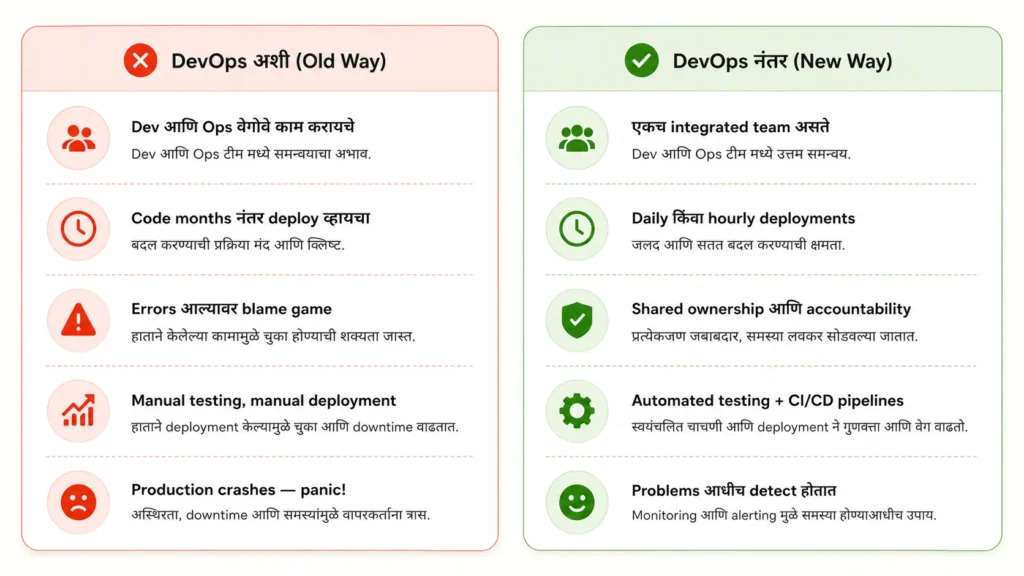
आपण एक उदाहरण घेऊ. समजा तुम्ही एका restaurant मध्ये गेलात. Chef ने जेवण बनवलं, पण waiter वेळेत deliver केलं नाही. यामुळे जेवण थंड झालं, customer नाराज झाला.
Software industry मध्ये हेच होत होतं — Developers code लिहायचे, आणि Operations team ते production वर deploy करायची. या दोन teams मध्ये communication नसायचं, blame game व्हायचं, आणि software delivery slow व्हायची.
DevOps ने हे solve केलं. Development आणि Operations ला एकत्र आणून — shared tools, shared responsibility, आणि automation च्या माध्यमातून — software delivery 10x faster करणे शक्य झालं.
DevOps हे एक tool नाही, framework नाही — ती एक philosophy आहे. याला support करायला अनेक tools आहेत (Docker, Kubernetes, Jenkins, Git), पण मुळात DevOps म्हणजे लोकांची mentality बदलणे.
DevOps का आलं? | History & Background | Why DevOps?
2009 साली Patrick Debois यांनी Belgium मध्ये पहिली “DevOpsDays” conference आयोजित केली. तिथूनच “DevOps” हा शब्द जगभर पसरला. पण खरंच हे का गरजेचं होतं?
Amazon, Google, and Netflix सारख्या companies ला दिवसाला शेकडो वेळा software update करायचे होते. Traditional waterfall किंवा अगदी Agile method ने हे शक्य नव्हतं. तेव्हा DevOps culture चा उदय झाला.
1. Speed of Delivery : Netflix दिवसाला 100+ deployments करते. DevOps शिवाय हे अशक्य आहे.
2. Reliability : Automated testing मुळे bugs production पर्यंत पोहोचत नाहीत.
3. Cost Reduction: Manual काम कमी होते – infrastructure costs 40-60% पर्यंत कमी होऊ शकतात.
4. Team Collaboration: Dev आणि Ops एकत्र काम केल्याने communication issues संपतात.
DevOps Lifecycle – 8 Stages
DevOps एका infinite loop मध्ये काम करते, याला आपण “DevOps Infinity Loop” म्हणतो. खाली प्रत्येक stage सोप्या भाषेत समजून घेऊ:
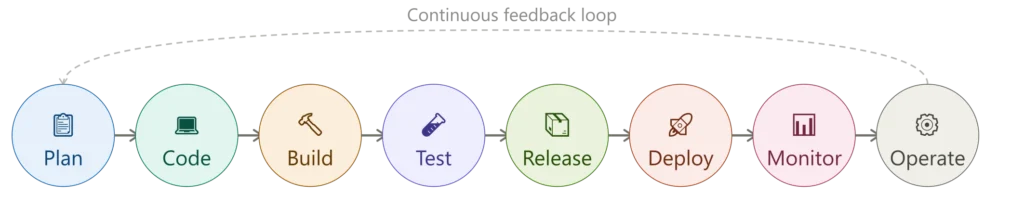
प्रत्येक stage म्हणजे काय?
1. Plan: काय बनवायचे हे ठरवणे — Jira, Trello वापरून project planning.
2. Code: Developers write code in Git. Code review happens. Pull requests merge होतात.
3. Build: Code compile होतो, libraries install होतात — Maven, Gradle, npm वापरतात.
4. Test: Automated tests run होतात — unit tests, integration tests, security scans.
5. Release: Code production साठी ready करणे — versioning, tagging.
6. Deploy: Code प्रत्यक्ष servers वर push होतो, Docker, Kubernetes, Ansible वापरतात.
7. Monitor: Production मध्ये काय चालू आहे हे track करणे, Prometheus, Grafana, Datadog.
8. Operate: Infrastructure manage करणे, uptime maintain करणे.
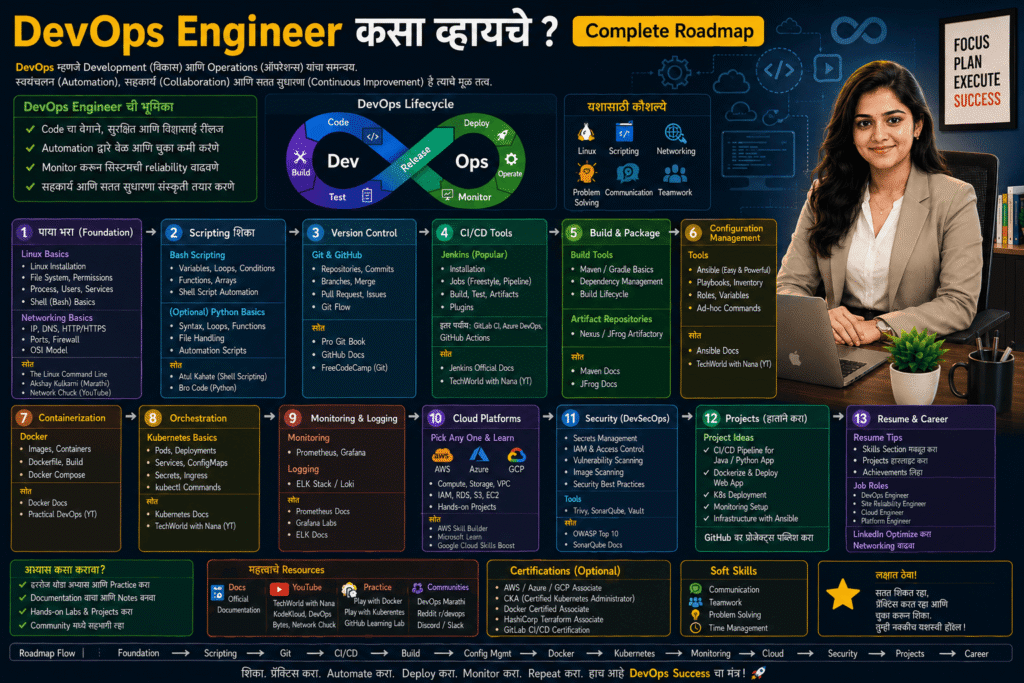
DevOps Engineer काय करतो? | DevOps Engineer Work in Marathi
एक DevOps Engineer म्हणजे Developer आणि System Admin यांच्यामधला bridge. तो दोन्ही बाजू समजतो आणि दोन्हींना जोडतो.
Day-to-day मध्ये DevOps Engineer काय करतो? CI/CD pipelines तयार करतो, Infrastructure as Code लिहितो, containers (Docker) manage करतो, monitoring alerts set up करतो, security patches apply करतो, cloud resources provision करतो, आणि production incidents handle करतो.
1. CI/CD Pipelines: Jenkins, GitHub Actions वापरून code automatically test आणि deploy करण्याची system तयार करतो.
2. Containerization: Docker वापरून applications containers मध्ये pack करतो. Kubernetes ने scale करतो.
3. Cloud Management: AWS, Azure, GCP वर infrastructure manage करतो. Terraform वापरून IaC लिहितो.
4. Monitoring & Alerting: Production systems monitor करतो. Problems येण्यापूर्वीच alerts set up करतो.
5. DevSecOps: Security हे DevOps मध्येच integrate करतो, vulnerability scans, compliance checks.
6. Automation: Repetitive manual tasks automate करतो, Bash, Python, Ansible scripts लिहितो.
DevOps साठी कोणती Skills लागतात?
DevOps Core Skills (Must Have)
- Linux / Unix
- Git & GitHub
- Python / Bash
- Docker
- CI/CD Tools
- Cloud (AWS/Azure)
Important Tools
- Kubernetes
- Terraform
- Ansible
- Prometheus
- Grafana
- Jenkins
- GitHub Actions
- ELK Stack
Advanced / Bonus Skills
- Service Mesh
- DevSecOps
- GitOps / ArgoCD
- Helm Charts
Beginners साठी टीप: सगळं एकत्र शिकायला जाऊ नका. पहिले Linux → Git → Docker → CI/CD हा sequence follow करा. Basics strong असल्यावर बाकी सगळं सोपं होतं.
DevOps शिकण्याचा Roadmap | DevOps शिकायला किती वेळ लागतो?
हा एक realistic roadmap आहे — हे assume करतो की तुम्ही रोज 2-3 तास dedicate करत आहात.
| Phase | काय शिकायचं? | Tools / Resources | वेळ |
|---|---|---|---|
| Phase 1 Foundation | Linux commands, Networking basics, Git version control, Shell scripting | Linux Journey, Pro Git Book, YouTube | 4–6 आठवडे |
| Phase 2 Containers | Docker – containers, images, Dockerfile, Docker Compose, container networking | Docker Docs, KodeKloud, Play with Docker | 3–4 आठवडे |
| Phase 3 CI/CD | Jenkins pipelines, GitHub Actions, automated testing, artifact management | Jenkins Docs, GitHub Learning Lab | 3–4 आठवडे |
| Phase 4 Cloud | AWS basics – EC2, S3, VPC, IAM, RDS. एक certification target करा. | AWS Free Tier, Stephane Maarek (Udemy) | 6–8 आठवडे |
| Phase 5 Orchestration | Kubernetes – pods, deployments, services, ingress, Helm charts | KodeKloud, Kubernetes Docs, CKA prep | 6–8 आठवडे |
| Phase 6 IaC & Monitoring | Terraform, Ansible, Prometheus, Grafana, logging with ELK | HashiCorp Learn, Grafana Tutorials | 4–6 आठवडे |
एकूण वेळ किती लागतो? – Consistent effort ने 6 ते 12 महिने मध्ये तुम्ही job-ready होऊ शकता. IT background असेल तर 4–6 महिने पुरेसे आहेत. Freshers साठी 8–12 महिने realistic आहे. Projects बनवा. GitHub वर push करा – certification पेक्षा practical experience जास्त महत्त्वाचे आहे.
DevOps Engineer Salary – India मध्ये किती मिळते?
DevOps हे IT मधलं one of the highest-paying roles आहे. खाली India मधील average salaries (2025-26) आहेत:
- Fresher (0-1 yr) : ₹4–7 LPA
- Mid-Level (2-4 yr): ₹10–18 LPA
- Senior (5+ yr): ₹20–35 LPA
- Lead / Architect: ₹35–60+ LPA
Remote Opportunities
DevOps roles मध्ये remote-friendly jobs खूप आहेत — US/EU companies साठी ₹50–80 LPA पण मिळतं.
DevOps vs Traditional Model
| मुद्दा | Traditional | DevOps |
|---|---|---|
| Teams | Dev आणि Ops वेगळे | एकत्र, shared responsibility |
| Release | महिन्यातून एकदा | रोज / अनेक वेळा |
| Testing | शेवटी manual | प्रत्येक commit वर automated |
| Failure झाल्यास | Blame game | Quick rollback, मग learning |
| Infrastructure | Manual setup | Code मध्ये (IaC) |
Hands-on: पहिला Container 10 मिनिटांत
Docker install करा आणि terminal मध्ये हे run करा:
docker --version
docker run hello-world
docker run -d -p 8080:80 --name mysite nginx
Browser मध्ये http://localhost:8080 उघडा. तुमचा पहिला web server चालू झाला. आता बंद करा:
docker ps
docker stop mysite
docker rm mysite
समजून घ्या: -d म्हणजे background मध्ये चालवा, -p 8080:80 म्हणजे तुमच्या computer चा port 8080 container च्या port 80 ला जोडा.
पहिली CI/CD Pipeline (GitHub Actions)
तुमच्या repo मध्ये .github/workflows/ci.yml file बनवा:
name: CI
on:
  push:
    branches: [main]
jobs:
  test:
    runs-on: ubuntu-latest
    steps:
      - uses: actions/checkout@v4
      - uses: actions/setup-python@v5
        with:
          python-version: "3.12"
      - run: pip install -r requirements.txt
      - run: pytest
Beginners च्या 5 सामान्य चुका
- Tools आधी शिकणे आणि Linux basics नंतर (उलट करा).
- एकाच वेळी Kubernetes, Terraform आणि AWS शिकायला जाणे.
- फक्त videos बघणे आणि hands-on न करणे.
- Certificate मिळवणे पण GitHub वर एकही project नसणे.
- Free tier मध्ये cloud resources चालू ठेवून विसरणे आणि bill येणे. Billing alert नक्की लावा.
Portfolio साठी 3 Projects
- Static website deploy: Nginx + Docker आणि GitHub Actions ने auto-deploy.
- Python/Flask app: Dockerize करा, test pipeline बनवा, AWS EC2 वर deploy करा.
- Monitoring setup: Prometheus + Grafana ने तुमच्या app चा dashboard बनवा.
हे तिन्ही GitHub वर README आणि screenshots सह टाका. Recruiters हेच बघतात.
माझा अनुभव: WordPress Server वर Git Deployment
मी WordPress developer म्हणून काम करतो. सुरुवातीला मी theme मध्ये बदल केला की FTP/cPanel File Manager ने file upload करायचो. [एका client project मध्ये] यामुळे दोन वेळा चुकीची file overwrite झाली आणि site काही मिनिटे down गेली. तेव्हा मला कळलं की manual deployment हीच DevOps ची सर्वात पहिली समस्या आहे.
मग मी हा workflow सेट केला:
- Custom theme आणि plugin चा code GitHub repo मध्ये ठेवला.
uploads,wp-config.phpआणि cache.gitignoreमध्ये टाकले. mainbranch ला push केला की GitHub Actions आपोआप server वर theme deploy करतं.- Server वर फक्त SSH key access दिला. Password नाही.
name: Deploy Theme
on:
  push:
    branches: [main]
jobs:
  deploy:
    runs-on: ubuntu-latest
    steps:
      - uses: actions/checkout@v4
      - name: Deploy via rsync
        run: |
          mkdir -p ~/.ssh
          echo "${{ secrets.SSH_KEY }}" > ~/.ssh/id_rsa
          chmod 600 ~/.ssh/id_rsa
          ssh-keyscan -H ${{ secrets.HOST }} >> ~/.ssh/known_hosts
          rsync -avz --delete ./my-theme/ \
${{ secrets.USER }}@${{ secrets.HOST }}:/path/to/wp-content/themes/my-theme/SSH_KEY, HOST आणि USER हे GitHub repo च्या Settings → Secrets मध्ये ठेवा, code मध्ये कधीही नाही.
वारंवार विचारले जाणारे प्रश्न | Frequently Asked Questions
हे questions Google, ChatGPT, आणि Gemini मध्ये सर्वात जास्त विचारले जातात, म्हणून आम्ही सरळ उत्तरे दिली आहेत.
Q1. DevOps शिकायला coding येणं गरजेचं आहे का?
Ans: Programming expert असणं गरजेचं नाही, पण basic scripting, खासकरून Bash and Python येणं खूप उपयुक्त आहे. Linux commands, loops, functions, and file handling जरी शिकलात तरी DevOps साठी पुरेसं आहे. Hardcore programming नाही लागत.
Q2. DevOps Engineer आणि Software Developer मध्ये काय फरक आहे?
Ans: Developer application logic लिहितो — features, APIs, databases. DevOps Engineer त्या code ला safely आणि quickly production मध्ये पोहोचवण्यासाठी infrastructure, pipelines, आणि automation तयार करतो. Developer “काय बनवायचं” यावर focus करतो, DevOps “कसं deploy करायचं आणि कसं चालवायचं” यावर.
Q3. DevOps म्हणजे फक्त Docker आणि Kubernetes आहे का?
Ans: नाही! Docker आणि Kubernetes हे DevOps मधील important tools आहेत, पण DevOps ही एक broader philosophy आहे. CI/CD, automation, monitoring, collaboration, Infrastructure as Code — हे सगळं DevOps मध्ये येतं. Tools बदलत राहतात, mindset महत्त्वाचा आहे.
Q4. Arts / Non-IT background असतानासुद्धा DevOps शिकता येईल का?
Ans: हो, नक्कीच! पण थोडा जास्त वेळ लागेल. पहिले Computer Basics, Networking, आणि Linux शिका. नंतर Git आणि Docker. Consistency ठेवल्यास 12-15 महिन्यात entry-level DevOps role मिळवणं शक्य आहे. Online communities (Reddit, Discord, LinkedIn) खूप helpful आहेत.
Q5. कोणती Certifications करायला हवीत?
Ans: सुरुवातीला AWS Certified Cloud Practitioner (easy, good foundation) करा. नंतर CKA (Certified Kubernetes Administrator) किंवा AWS Solutions Architect Associate target करा. HashiCorp Terraform Associate ही छान certification आहे. Certifications helpful आहेत पण projects आणि GitHub portfolio जास्त महत्त्वाचं आहे recruiters साठी.
Q6. DevOps आणि SRE (Site Reliability Engineering) मध्ये काय फरक आहे?
Ans: SRE हे Google ने introduce केलेलं concept आहे. DevOps च्या principles वर based, पण जास्त engineering-focused आहे. DevOps एक broader culture आहे, SRE हे त्या culture ला implement करण्याचा एक specific approach आहे. SRE मध्ये reliability, SLAs, error budgets, toil reduction यावर जास्त focus असतो. Senior DevOps engineers अनेकदा SRE roles मध्ये जातात.
हा article तुम्हाला उपयुक्त वाटला का? Share करा, Maharashtra मधल्या आणखी एखाद्या तरुणाला DevOps career बद्दल माहिती मिळेल. प्रश्न असल्यास comment करा. DevOps journey मध्ये एकट्याने चालू नका; community सोबत शिका, जास्त जलद progress होतो.
पुढे काय शिकाल?