रुपेश पवार
IT Professional 5+ वर्षांचा अनुभव
प्रकाशित
15 मार्च 2026
वाचण्याचा वेळ
14 मिनिटे
स्तर
Beginner
Table of Contents
Programming शिकताना सर्वात आधी Data Types समजणे जरुरी आहे कारण data type ठरवतो की variable मध्ये कोणती value ठेवता येते आणि त्यावर कोणते operations करता येतात. Integer, Float, String, List, Tuple, Dictionary, Set आणि Boolean सर्व 8 data types real-world उदाहरणांसह मराठीत शिका.
Python Data Types म्हणजे काय? | मराठीत सोपे स्पष्टीकरण
आपण कागदावर लिहितो तेव्हा काही ठिकाणी संख्या लिहितो (जसे वय: 25), काही ठिकाणी नाव (राहुल), काही ठिकाणी यादी (फळे: आंबा, केळे, संत्रा). Computer ला देखील प्रत्येक प्रकारच्या माहितीसाठी वेगळी “जागा” (memory) लागते. हेच काम Data Types करतात.
Data Type म्हणजे काय?
Python Data Type म्हणजे variable मध्ये कोणत्या प्रकारची value (माहिती) save आहे हे सांगणारा label. Data type ठरवतो की त्या variable वर कोणते operations करता येतील, किती memory लागेल, आणि Python ती value कशी handle करेल.
वास्तविक जीवनाशी तुलना
Data types समजण्यासाठी आपण एका शाळेचे उदाहरण घेऊ. शाळेत वेगवेगळ्या वस्तू वेगळ्या ठिकाणी ठेवतात:
| वास्तविक जीवन | Python Data Type Marathi | उदाहरण |
|---|---|---|
| विद्यार्थ्यांची संख्या (50) | Integer (int) | students = 50 |
| सरासरी marks (87.5%) | Float (float) | average = 87.5 |
| शाळेचे नाव | String (str) | school = “ज्ञानदीप” |
| विद्यार्थ्यांची यादी | List (list) | [“राहुल”,”प्रिया”] |
| GPS Coordinates (fixed) | Tuple (tuple) | (18.5, 73.8) |
| विद्यार्थ्याची माहिती | Dictionary (dict) | {“नाव”:”राहुल”,”वय”:18} |
| Unique subjects set | Set (set) | {“Math”,”Science”} |
| शाळा उघडी आहे का? | Boolean (bool) | is_open = True |
Python चे 8 Data Types – एका नजरेत
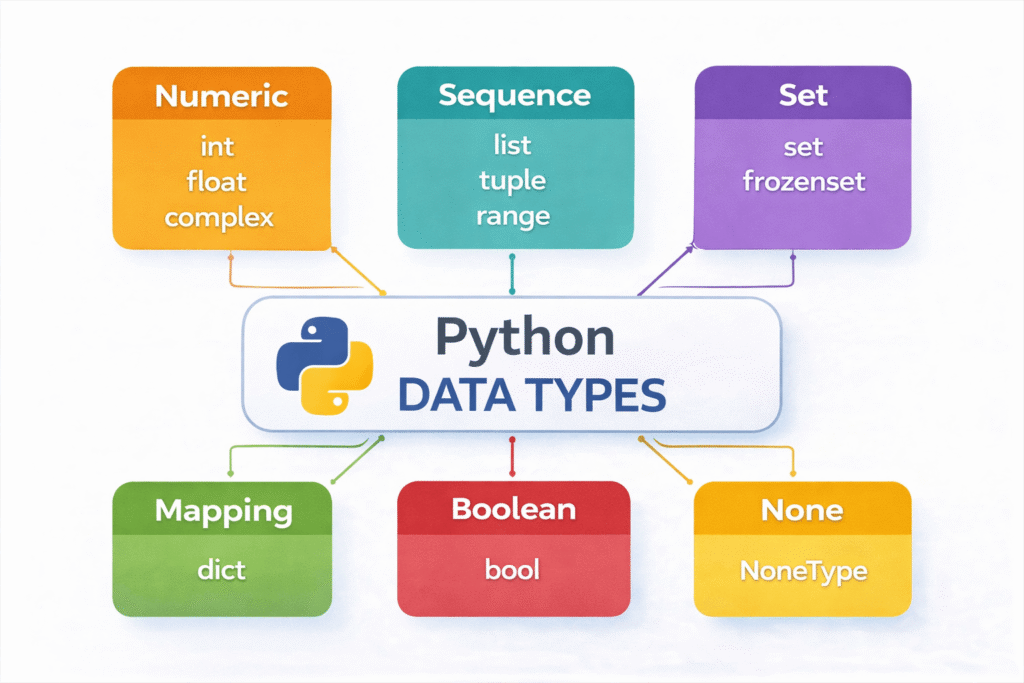
1. int – पूर्ण संख्या 25, -10, 0
2. float – दशांश संख्या 3.14, -0.5
3. str – मजकूर / Text “Python”
4. list – बदलता येणारी यादी [1, 2, 3]
5. tuple – न बदलणारी यादी (1, 2, 3)
6. dict – Key-Value जोड्या {“key”:”val”}
7. set – Unique values {1, 2, 3}
8. bool – True / False True, False
1. Integer (int) – पूर्ण संख्या
Integer म्हणजे decimal point (.) नसलेल्या पूर्ण संख्या. Positive, negative किंवा zero — तिन्ही integer असू शकतात. Python मध्ये integer ची size limit नाही — कितीही मोठी संख्या integer म्हणून store करता येते.
#Integer चे विविध प्रकार
वय = 22 # Positive integer
तापमान = -5 # Negative integer
शून्य = 0 # Zero
लोकसंख्या = 1400000000 # मोठी संख्या (भारताची लोकसंख्या)
#Mathematical operations
a = 15
b = 4
print(f”बेरीज: {a + b}”) # 19
print(f”वजाबाकी: {a – b}”) # 11
print(f”गुणाकार: {a * b}”) # 60
print(f”भागाकार: {a // b}”) # 3 (पूर्ण भाग)
print(f”बाकी (Modulo): {a % b}”) # 3
print(f”घात (Power): {a ** b}”) # 50625
print(f”Type: {type(वय)}”) #
Output:
बेरीज: 19
वजाबाकी: 11
गुणाकार: 60
भागाकार: 3
बाकी (Modulo): 3
घात (Power): 50625
Type: <class ‘int’>
Integer कुठे वापरतात?
विद्यार्थ्यांची संख्या, वय, scores, inventory count, page number, loop counter — जिथे दशांश नको तिथे नेहमी int वापरा.
2. Float (float) – दशांश संख्या
Float म्हणजे decimal point (.) असलेल्या संख्या. वैज्ञानिक गणना, किंमत, तापमान, मोजमाप — जिथे अचूकता महत्त्वाची असते तिथे float वापरतो.
किंमत = 299.99
तापमान = 36.6
pi = 3.14159
negative_float = -0.5
#Float calculations
length = 5.5
width = 3.2
area = length * width
print(f”क्षेत्रफळ: {area:.2f} चौरस मीटर”)
#Percentage calculate करा
marks = 432
total = 500
percentage = (marks / total) * 100
print(f”Percentage: {percentage:.1f}%”)
#Scientific notation
light_speed = 3e8 # 300000000.0 (3 × 10^8)
print(f”प्रकाशाचा वेग: {light_speed} m/s”)
Output:
क्षेत्रफळ: 17.60 चौरस मीटर
Percentage: 86.4%
प्रकाशाचा वेग: 300000000.0 m/s
Float Precision Error!
0.1 + 0.2 चे उत्तर Python मध्ये 0.30000000000000004 येते! हे floating-point arithmetic चा एक known issue आहे. अचूक calculation साठी round(result, 2) किंवा decimal module वापरा.
3. String (str) — मजकूर / Text
String म्हणजे characters (अक्षरे, संख्या, symbols) चा एक क्रम. Single quotes ‘ ‘ किंवा double quotes ” ” मध्ये लिहितो. Python मध्ये String immutable असतो म्हणजे एकदा बनवल्यावर बदलता येत नाही.
#String बनवणे
नाव = “रुपेश पवार”
शहर = ‘पुणे’
multi_line = “””हा
multi-line
string आहे”””
#String Concatenation (जोडणे)
पहिलेनाव = “रुपेश” आडनाव = “पवार” पूर्णनाव = पहिलेनाव + ” ” + आडनाव print(पूर्णनाव)
#f-string (सर्वात सोपा)
वय = 28
print(f”नाव: {नाव}, वय: {वय}”)
#Indexing — अक्षर मिळवा
word = “Python”
print(word[0]) # P (पहिले अक्षर)
print(word[-1]) # n (शेवटचे अक्षर)
print(word[0:3]) # Pyt (slicing)
OUTPUT
रुपेश पवार
नाव: रुपेश पवार, वय: 28
P
n
Pyt
महत्त्वाचे String Methods
text = ” Hello, Python World! “
print(text.upper()) # सर्व UPPERCASE
print(text.lower()) # सर्व lowercase
print(text.strip()) # आधी/नंतरचे spaces काढा
print(text.replace(“Python”, “Marathi”)) # Replace
print(text.split(“,”)) # List मध्ये split करा
print(len(text.strip())) # String ची लांबी
print(“Python” in text) # String आत आहे का?
OUTPUT
HELLO, PYTHON WORLD!
hello, python world!
Hello, Python World!
Hello, Marathi World!
[‘ Hello’, ‘ Python World! ‘]
21
True
4. List (list) — बदलता येणारी यादी
List म्हणजे ordered आणि mutable (बदलता येणारा) collection. एका list मध्ये वेगवेगळ्या data types च्या values ठेवता येतात. Square brackets [ ] वापरून list बनवतो.
#List बनवणे
फळे = [“आंबा”, “केळे”, “संत्रा”, “द्राक्षे”]
marks = [85, 92, 78, 88, 95]
mixed = [“राहुल”, 22, 87.5, True] # Mixed types allowed
#Indexing
print(फळे[0]) # आंबा (पहिला)
print(फळे[-1]) # द्राक्षे (शेवटचा)
#List Methods
फळे.append(“पेरू”) # शेवटी घाला
फळे.insert(1, “चिकू”) # index 1 वर घाला
फळे.remove(“केळे”) # काढा
print(फळे)
#List operations
print(f”एकूण फळे: {len(फळे)}”)
print(f”सर्वात जास्त marks: {max(marks)}”)
print(f”सर्वात कमी marks: {min(marks)}”)
print(f”सरासरी marks: {sum(marks)/len(marks):.1f}”)
OUTPUT
आंबा
द्राक्षे
[‘आंबा’, ‘चिकू’, ‘संत्रा’, ‘द्राक्षे’, ‘पेरू’]
एकूण फळे: 5
सर्वात जास्त marks: 95
सर्वात कमी marks: 78
सरासरी marks: 87.6
5. Tuple (tuple) – न बदलणारी यादी
Tuple हे List सारखेच असते, फरक एवढाच की Tuple immutable असतो — एकदा बनवल्यावर त्यात बदल करता येत नाही. Parentheses ( ) वापरून tuple बनवतो. Tuple List पेक्षा जलद असतो आणि कमी memory वापरतो.
#Tuple बनवणे
coordinates = (18.5204, 73.8567) # पुण्याचे GPS
colors = (“लाल”, “हिरवा”, “निळा”)
student_info = (“प्रिया”, 20, “Engineering”)
#Indexing
print(coordinates[0]) # 18.5204 (latitude)
print(colors[2]) # निळा
#Tuple Unpacking
नाव, वय, शाखा = student_info
print(f”नाव: {नाव}, वय: {वय}, शाखा: {शाखा}”)
#Tuple मध्ये बदल करता येत नाही — हे ERROR देईल!
#coordinates[0] = 19.0 → TypeError!
#Count आणि Index
nums = (1, 2, 3, 2, 4, 2)
print(f”2 किती वेळा आहे: {nums.count(2)}”)
print(f”3 चा index: {nums.index(3)}”)
Output
18.5204
निळा
नाव: प्रिया, वय: 20, शाखा: Engineering
2 किती वेळा आहे: 3
3 चा index: 2
List vs Tuple – कधी कुठले वापरावे?
List वापरा जेव्हा data बदलणार असेल — shopping cart, student marks, to-do list.
Tuple वापरा जेव्हा data fix असेल — GPS coordinates, RGB colors, database records, function return values.
6. Dictionary (dict) – Key-Value माहिती
Dictionary म्हणजे key-value pairs चा collection. जसे आपण इंग्रजी dictionary मध्ये शब्द (key) शोधतो आणि त्याचा अर्थ (value) मिळतो — अगदी तसेच Python dictionary काम करतो. Curly braces { } वापरून बनवतो.
#Dictionary बनवणे
विद्यार्थी = {
“नाव”: “राहुल पाटील”,
“वय”: 21,
“शहर”: “पुणे”,
“marks”: [85, 92, 78],
“active”: True
}
#Value मिळवणे
print(विद्यार्थी[“नाव”]) # राहुल पाटील
print(विद्यार्थी.get(“शहर”)) # पुणे (safe method)
#Value update करणे
विद्यार्थी[“शहर”] = “मुंबई”
विद्यार्थी[“email”] = “rahul@email.com” # नवी key घाला
#Keys, Values, Items
print(list(विद्यार्थी.keys())) # सर्व keys
print(list(विद्यार्थी.values())) # सर्व values
#Loop वापरून सर्व माहिती print करा
for key, value in विद्यार्थी.items():
print(f”{key}: {value}”)
Output
राहुल पाटील
पुणे
[‘नाव’, ‘वय’, ‘शहर’, ‘marks’, ‘active’, ’email’]
[‘राहुल पाटील’, 21, ‘मुंबई’, [85, 92, 78], True, ‘rahul@email.com’]
नाव: राहुल पाटील
वय: 21
शहर: मुंबई
marks: [85, 92, 78]
active: True
email: rahul@email.com
7. Set (set) – Unique Values चा संग्रह
Set म्हणजे unique (न दुजाळलेल्या) values चा unordered collection. Set मध्ये duplicate values automatically remove होतात. जेव्हा आपल्याला फक्त unique items हवे असतात तेव्हा set खूप उपयुक्त आहे.
#Set बनवणे — duplicate values आपोआप निघतात
numbers = {1, 2, 3, 4, 4, 5, 5, 5}
print(numbers) # {1, 2, 3, 4, 5} — duplicates गेले
#Real use: List मधील unique values मिळवा
votes = [“राहुल”, “प्रिया”, “राहुल”, “अमित”, “प्रिया”, “राहुल”]
unique_voters = set(votes)
print(f”Unique voters: {unique_voters}”)
print(f”एकूण unique: {len(unique_voters)}”)
#Set Operations — गणित सारखे
class_A = {“राहुल”, “प्रिया”, “अमित”}
class_B = {“प्रिया”, “सुमित”, “अमित”}
print(“Union (A ∪ B):”, class_A | class_B) # दोन्ही मिळून
print(“Intersection (A ∩ B):”, class_A & class_B) # दोन्हीत आहेत ते
print(“Difference (A – B):”, class_A – class_B) # फक्त A मध्ये आहेत
Output
{1, 2, 3, 4, 5}
Unique voters: {‘राहुल’, ‘प्रिया’, ‘अमित’}
एकूण unique: 3
Union (A ∪ B): {‘राहुल’, ‘प्रिया’, ‘अमित’, ‘सुमित’}
Intersection (A ∩ B): {‘प्रिया’, ‘अमित’}
Difference (A – B): {‘राहुल’}
8. Boolean (bool) – True / False
Boolean हा सर्वात सोपा data type आहे — फक्त दोन values: True किंवा False. Conditions, loops, decision making — सर्वत्र Boolean वापरला जातो. Python मध्ये True = 1 आणि False = 0 असते.
#Basic Boolean
is_logged_in = True
is_admin = False
is_active = True
#Comparison operations — Boolean return करतात
print(10 > 5) # True
print(10 == 20) # False
print(10 != 20) # True
print(“Python” in [“Python”, “Java”]) # True
#bool() function — कोणती values False असतात?
print(bool(0)) # False (zero)
print(bool(“”)) # False (empty string)
print(bool([])) # False (empty list)
print(bool(None)) # False
print(bool(42)) # True (non-zero)
print(bool(“Hello”)) # True (non-empty)
#Boolean arithmetic
print(True + True) # 2 (True = 1)
print(True * 5) # 5
Output
True
False
True
True
False
False
False
False
True
True
2
5
type() Function आणि Type Conversion
Python मध्ये type() function वापरून variable चा data type जाणून घेता येतो. आणि एक type दुसऱ्यात convert करण्यासाठी Type Conversion (Casting) वापरतो.
#type() — Data type तपासा
print(type(25)) #
print(type(3.14)) #
print(type(“Python”)) #
print(type([1,2,3])) #
print(type(True)) #
#Type Conversion (Casting)
#String → Integer
user_input = “25”
वय = int(user_input)
print(वय + 5) # 30
#Integer → Float
print(float(10)) # 10.0
#Integer → String
संख्या = 42
text = “उत्तर: ” + str(संख्या)
print(text) # उत्तर: 42
#List → Set (duplicates remove)
lst = [1,2,2,3,3]
print(set(lst)) # {1, 2, 3}
#isinstance() — type तपासणे
print(isinstance(25, int)) # True
print(isinstance(“Hi”, str)) # True
OUTPUT
<class 'int'> <class 'float'> <class 'str'> <class 'list'> <class 'bool'> 30 10.0 उत्तर: 42 {1, 2, 3} True True
सर्व Data Types ची तुलना – Marathi
| Data Type | Ordered? | Mutable? | Duplicates? | Syntax | वापर |
|---|---|---|---|---|---|
| int | — | होय | — | 25 | गणना, count |
| float | — | होय | — | 3.14 | दशांश गणना |
| str | होय | नाही | होय | “text” | मजकूर |
| list | होय | होय | होय | [ ] | बदलणारी यादी |
| tuple | होय | नाही | होय | ( ) | Fix data |
| dict | होय* | होय | Keys: नाही | { } | Key-value data |
| set | नाही | होय | नाही | { } | Unique values |
| bool | — | — | — | True/False | Conditions |
Real-World Project – Student Management System
आपण शिकलेले सर्व 8 Data Types एकत्र वापरून एक संपूर्ण Student Management System बनवूया:
#सर्व 8 Data Types एकत्र वापरलेले आहेत
#int — roll number
#float — सरासरी marks
#str — नाव
#list — विषयांचे marks
#tuple — जन्मतारीख (fix data)
#dict — संपूर्ण माहिती
#set — unique subjects
#bool — scholarship eligible?
students_db = [
{
“roll_no”: 101, # int
“नाव”: “प्रिया शर्मा”, # str
“जन्मतारीख”: (2004, 5, 15), # tuple
“marks”: [88, 92, 85, 90, 87], # list
“subjects”: {“Math”, “Science”, “English”}, # set
},
{
“roll_no”: 102,
“नाव”: “राहुल पाटील”,
“जन्मतारीख”: (2003, 11, 20),
“marks”: [72, 68, 75, 80, 70],
“subjects”: {“Math”, “History”,
“English”},
}
]
print(f”{‘=’50}”)
print(f” विद्यार्थी Report Card”)
print(f”{‘=’50}”)
for s in students_db:
एकूण = sum(s[“marks”])
सरासरी = एकूण / len(s[“marks”]) #
float scholarship = सरासरी >= 85.0 # bool
print(f”\nRoll No: {s[‘roll_no’]}”)
print(f”नाव: {s[‘नाव’]}”)
print(f”जन्मवर्ष: {s[‘जन्मतारीख’][0]}”)
print(f”Marks: {s[‘marks’]}”)
print(f”Subjects: {s[‘subjects’]}”)
print(f”सरासरी: {सरासरी:.1f}%”)
print(f”Scholarship: {‘✓ पात्र’ if scholarship else ‘✗ अपात्र’}”)
print(f”{‘-‘*30}”)
OUTPUT
विद्यार्थी Report Card
Roll No: 101
नाव: प्रिया शर्मा
जन्मवर्ष: 2004
Marks: [88, 92, 85, 90, 87]
Subjects: {‘Math’, ‘Science’, ‘English’}
सरासरी: 88.4%
Scholarship: ✓ पात्र
Roll No: 102
नाव: राहुल पाटील
जन्मवर्ष: 2003
Marks: [72, 68, 75, 80, 70]
Subjects: {‘Math’, ‘History’, ‘English’}
सरासरी: 73.0%
Scholarship: ✗ अपात्र
Python Data Types – Key Takeaways
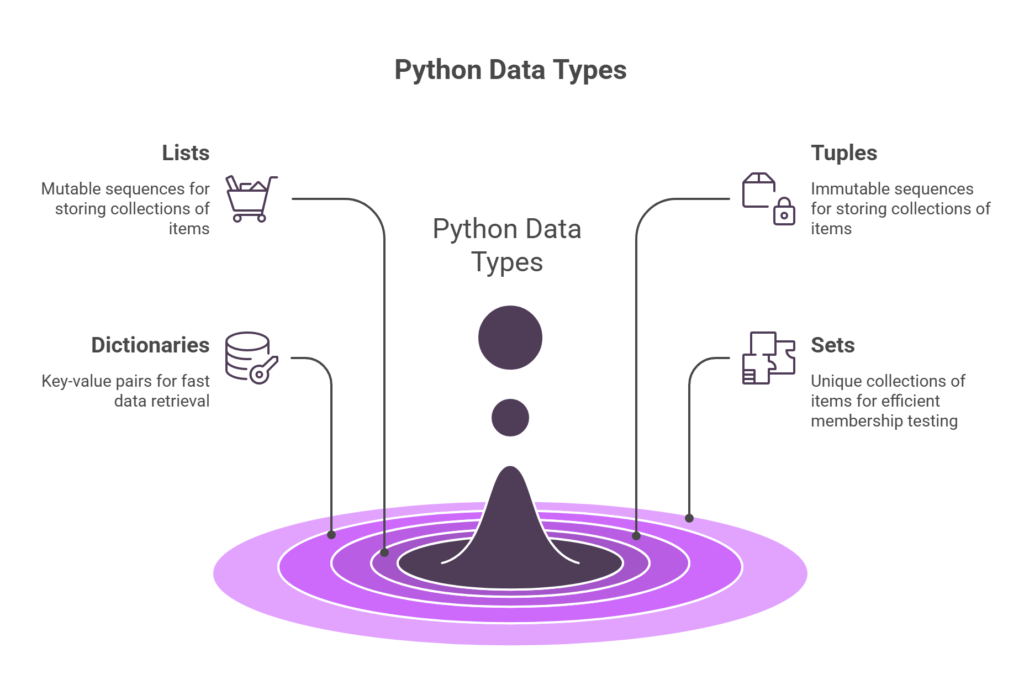
- Python मध्ये multiple built-in data types आहेत.
- Data type ठरवतो variable behavior
- Lists mutable असतात
- Tuples immutable असतात
- Dictionaries fast lookup साठी वापरले जातात
- Sets unique values साठी वापरले जातात
Beginners च्या सामान्य चुका
1. String + Integer
“वय: ” + 25 — हे TypeError देते! Integer ला string मध्ये convert करा: “वय: ” + str(25) किंवा f-string वापरा.
2. List vs Tuple गोंधळ
Tuple immutable आहे — त्यात append, remove करता येत नाही. बदल करायचे असतील तर List वापरा.
3. Dict Key Error
dict[“नसलेली_key”] — KeyError येतो! त्याऐवजी dict.get(“key”) वापरा — नसेल तर None येतो, error नाही.
4. Float Comparison
0.1 + 0.2 == 0.3 — हे False येते! Float comparison साठी round() किंवा math.isclose() वापरा.
5. Mutable Default Arguments
Function मध्ये default argument म्हणून List किंवा Dict वापरू नका. दर call ला नवी list बनवा.
6. Best Practice
नेहमी type() किंवा isinstance() वापरून variable चा type तपासा. Error येण्याआधीच type conversion करा.
Practice Problems — स्वतः सोडवा
1. Contact Book
Dictionary वापरून 5 मित्रांचा contact book बनवा. प्रत्येक contact मध्ये नाव, phone, email आणि शहर असावे. नंतर शहरानुसार contacts filter करा.
2. Unique Words Counter
एक paragraph (string) घ्या. Set वापरून unique words शोधा. नंतर सांगा किती unique words आहेत आणि कोणते words duplicate आहेत.
3. Shopping Cart System
List वापरून shopping cart बनवा. Items add/remove करा. Dictionary वापरून प्रत्येक item ची किंमत (float) store करा. एकूण bill calculate करा.
4. Type Converter Tool
अभ्यासाची पद्धत:
प्रत्येक data type साठी स्वतः एक छोटा program लिहा. Code type करा, copy-paste नाही. Python IDLE, Jupyter Notebook, किंवा VS Code मध्ये practice करा. चुका होतील — त्या error messages नीट वाचा, त्यातूनच शिकाल!
सामान्य प्रश्न (FAQ) – Python Data Type – Marathi
Q1. Python मध्ये किती Data Types आहेत?
Ans: Python मध्ये 8 मुख्य built-in data types आहेत: Integer (int), Float (float), String (str), List (list), Tuple (tuple), Dictionary (dict), Set (set), आणि Boolean (bool). याशिवाय complex numbers, bytes, bytearray सारखे आणखी काही specialized types आहेत, पण beginners साठी ही 8 सर्वात महत्त्वाचे आहेत.
Q2. List आणि Tuple मध्ये काय फरक आहे?
Ans: List mutable आहे – म्हणजे बनवल्यानंतर त्यात items add, remove, change करता येतात. Square brackets [ ] वापरतो.
Tuple immutable आहे – बनवल्यानंतर बदलता येत नाही. Parentheses ( ) वापरतो. Tuple हा List पेक्षा जलद आणि कमी memory वापरतो. Fix data साठी (GPS, dates, RGB) tuple वापरावा; बदलणाऱ्या data साठी list वापरावी.
Q3. Dictionary आणि Set मध्ये दोन्ही { } आहेत फरक कसा ओळखायचा?
Ans: Dictionary: key:value pairs असतात — { "नाव": "राहुल", "वय": 21 }
Set: फक्त values असतात, key नाही — {1, 2, 3, "Python"}
रिकामे { } हे dictionary बनवते, रिकामे set बनवण्यासाठी set() वापरावे लागते.
Q4. type() आणि isinstance() मध्ये काय फरक आहे?
Ans: type(x) – variable चा exact type सांगतो. उदा: type(25) → int
isinstance(x, type) – variable एखाद्या type चा आहे का True/False सांगतो. उदा: isinstance(25, int) → True
Inheritance असेल तर isinstance() जास्त उपयुक्त आहे. Simple type check साठी type() वापरा.
Q5. Python मध्ये Type Conversion कसे करावे?
Ans: Python मध्ये type conversion साठी built-in functions वापरतो:
• int(“25”) → 25 (string to integer)
• float(10) → 10.0 (integer to float)
• str(42) → “42” (integer to string)
• list((1,2,3)) → [1,2,3] (tuple to list)
• set([1,2,2,3]) → {1,2,3} (list to set, duplicates जातात)
Q6. Mutable आणि Immutable म्हणजे काय?
Ans: Mutable (बदलता येणारे): int, float, list, dict, set – बनवल्यानंतर त्यांच्या values बदलता येतात.
Immutable (न बदलणारे): str, tuple, bool – एकदा बनवल्यावर त्यांच्यात बदल करता येत नाही. बदल करायचा असेल तर नवा object बनवावा लागतो.
Immutable types thread-safe असतात आणि dictionary keys म्हणून वापरता येतात.
पुढे काय शिकाल?

Python Data Types Interview MCQ Question and Answer in Marathi
फ्रेशर्ससाठी खास तयार केलेले Python data types interview MCQ questions and Answer in marathi येथे उपलब्ध आहेत. सर्व महत्त्वाचे Python interview questions and answers for freshers सोप्या उदाहरणांसह दिले आहेत. तसेच basic interview questions on Python for freshers देखील समाविष्ट केले आहेत. पहिल्या जॉबसाठी तयारी करणाऱ्यांसाठी हे परिपूर्ण कंटेंट आहे.