जर तुम्ही Engineering, BCA, BSc IT, BSc CS, MCA, MSc IT किंवा Polytechnic चे final year student असाल आणि तुम्हाला Python Projects for Final Year Students with source code शोधायचे असतील, तर हा लेख तुमच्यासाठी complete ultimate guide आहे.
Table of Contents
या ब्लॉगमध्ये Python in Marathi तुम्हाला:
1. Best Python final year projects
2. Beginner ते Advanced level projects
3. Project selection guide
4. Complete development roadmap
5. Documentation + PPT + Viva तयारी
6. Career guidance
हे सगळं step-by-step deep explanation मध्ये मिळेल.
Final Year Projects साठी Python का सर्वोत्तम पर्याय आहे?
1. Easy to Learn
Python ची syntax सोपी असल्यामुळे beginners सुद्धा सहज शिकू शकतात.
2. Huge Library Support
NumPy, Pandas, TensorFlow, OpenCV, Django, Flask यांसारख्या powerful libraries उपलब्ध आहेत.
3. Industry Demand
आजच्या IT industry मध्ये Python developer, Data Scientist, AI engineer यांना खूप demand आहे.
4. Future Proof Technology
Python future मध्ये सुद्धा top programming language राहणार आहे.
Python Projects for Final Year Students – Project निवडताना लक्षात ठेवायच्या महत्वाच्या गोष्टी
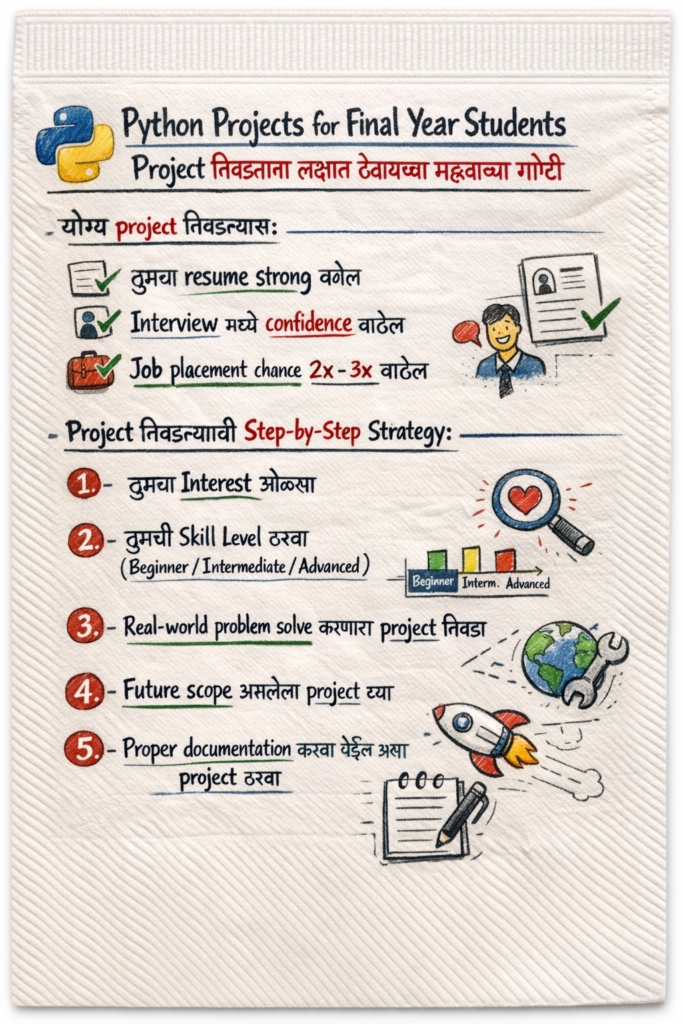
योग्य project निवडल्यास:
1. तुमचा resume strong बनेल
2. Interview मध्ये confidence वाढेल
3. Job placement chance 2x – 3x वाढेल
Project निवडण्याची Step-by-Step Strategy:
1. तुमचा Interest ओळखा
2. तुमची Skill Level ठरवा (Beginner / Intermediate / Advanced)
3. Real-world problem solve करणारा project निवडा
4. Future scope असलेला project घ्या
5. Proper documentation करता येईल असा project ठरवा
Beginner Level Python Final Year Projects (Complete Explanation)
1. Student Management System (SMS)
Project Description: विद्यार्थ्यांची माहिती, attendance, fees, result, आणि reports manage करणारी system.
Modules:
1. Admin Login
2. Student Entry
3. Attendance Module
4. Marks Module
5. Report Generation
Technologies:
1. Python
2. Tkinter
3. SQLite
Learning Outcome:
1. CRUD operations
2. Database handling
3. GUI development
2. Library Management System
Description: Library मधील सर्व books, members, issue-return records digital स्वरूपात manage करणारी system.
Core Features:
1. Book entry
2. Student membership
3. Issue-return tracking
4. Fine calculation
Intermediate Level Python Final Year Projects (Deep Learning Scope)
4. Face Recognition Attendance System
Description: AI वापरून चेहरा ओळखून automatic attendance घेणारी system.
Technologies:
1. Python
2. OpenCV
3. Deep Learning
Real-World Usage:
1. Colleges
2. Offices
3. Schools
5. Online Examination System
Description: Digital exam system – MCQ, subjective tests, auto evaluation.
6. E-commerce Website
Description: पूर्ण shopping website – cart, payment gateway, admin panel सह.
Advanced Level Python Final Year Projects (Industry-Level Projects)
7. AI Based Resume Screening System
Description: HR साठी smart AI system – हजारो resumes मधून best candidates shortlist करणारी system.
Tech:
1. Python
2. NLP
3. Machine Learning
8. AI Based Resume Screening System
Description: Machine Learning वापरून stock price trend predict करणारी system.
9. Fraud Detection System
Description: Online banking आणि financial fraud detect करणारी intelligent system.
10. Smart Traffic Management System
Description: AI आधारित smart traffic signal automation.
Python Final Year Project Development Roadmap (Step-by-Step)
Step 1: Requirement Analysis
Problem समजून घेणे, scope define करणे.
Step 2: System Design
Flowchart, DFD, UML diagrams तयार करणे.
Step 3: Database Design
Tables, relations, normalization.
Step 4: Coding
Python + frameworks वापरून development.
Step 5: Testing
Bug fixing, validation.
Step 6: Deployment
Localhost / Cloud hosting.
Documentation कशी तयार करावी? (Project Report Guide)
तुमच्या project report मध्ये हे chapters असणे गरजेचे आहे:
1. Introduction
2. Problem Statement
3. Existing System
4. Proposed System
5. System Architecture
6. Technology Used
7. Implementation
8. Result & Output
9. Conclusion
10. Future Scope
PPT Presentation Structure (Viva & Review साठी)
1. Title Slide
2. Problem Definition
3. Objectives
4. Architecture Diagram
5. Module Explanation
6. Demo Screens
7. Conclusion
Python Final Year Projects नंतर Career Opportunities
1. Python Developer
2. Data Analyst
3. Data Scientist
4. ML Engineer
5. AI Engineer
6. Backend Developer
7. Automation Engineer
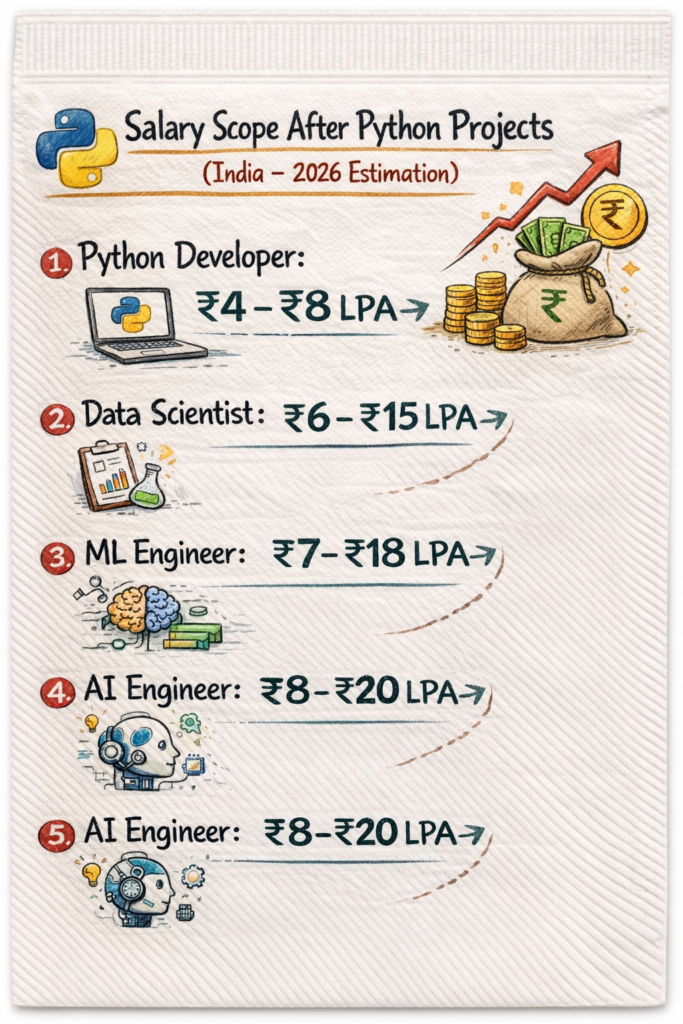
Salary Scope After Python Projects (India – 2026 Estimation)
Pro Tips for Maximum Marks & Placement
1. GitHub वर project upload करा
2. Live demo तयार ठेवा
3. Clear documentation ठेवा
4. PPT professional design मध्ये तयार करा
5. Viva questions ची तयारी करा
Student Management System – Complete Source Code
Technology: Python + Tkinter + SQLite
Level: Beginner to Intermediate
Platform: Windows / Linux / Mac
Project Structure
student_management_system/
│
├── main.py
├── database.py
└── students.db (auto-create होईल)
Features
1. Add Student
2. View Student
3. Update Student
4. Delete Student
5. Simple GUI
6. SQLite Database
Step 1: database.py (Database Code)
import sqlite3
def connect():
conn = sqlite3.connect(“students.db”)
cur = conn.cursor()
cur.execute(“””
CREATE TABLE IF NOT EXISTS student(
id INTEGER PRIMARY KEY,
name TEXT,
roll TEXT,
department TEXT,
year TEXT,
mobile TEXT
)
“””)
conn.commit()
conn.close()
def insert(name, roll, department, year, mobile):
conn = sqlite3.connect(“students.db”)
cur = conn.cursor()
cur.execute(“INSERT INTO student VALUES (NULL,?,?,?,?,?)”,
(name, roll, department, year, mobile))
conn.commit()
conn.close()
def view():
conn = sqlite3.connect(“students.db”)
cur = conn.cursor()
cur.execute(“SELECT * FROM student”)
rows = cur.fetchall()
conn.close()
return rows
def delete(id):
conn = sqlite3.connect(“students.db”)
cur = conn.cursor()
cur.execute(“DELETE FROM student WHERE id=?”, (id,))
conn.commit()
conn.close()
def update(id, name, roll, department, year, mobile):
conn = sqlite3.connect(“students.db”)
cur = conn.cursor()
cur.execute(“””
UPDATE student SET
name=?, roll=?, department=?, year=?, mobile=?
WHERE id=?
“””, (name, roll, department, year, mobile, id))
conn.commit()
conn.close()
connect()
Step 2: main.py (Main GUI Code)
from tkinter import *
import database
def get_selected_row(event):
global selected_tuple
index = listbox.curselection()[0]
selected_tuple = listbox.get(index)
e1.delete(0, END)
e1.insert(END, selected_tuple[1])
e2.delete(0, END)
e2.insert(END, selected_tuple[2])
e3.delete(0, END)
e3.insert(END, selected_tuple[3])
e4.delete(0, END)
e4.insert(END, selected_tuple[4])
e5.delete(0, END)
e5.insert(END, selected_tuple[5])
def view_command():
listbox.delete(0, END)
for row in database.view():
listbox.insert(END, row)
def add_command():
database.insert(name_text.get(), roll_text.get(),
dept_text.get(), year_text.get(), mobile_text.get())
view_command()
def delete_command():
database.delete(selected_tuple[0])
view_command()
def update_command():
database.update(selected_tuple[0], name_text.get(), roll_text.get(),
dept_text.get(), year_text.get(), mobile_text.get())
view_command()
window = Tk()
window.title(“Student Management System”)
window.geometry(“650×400”)
Label(window, text=”Name”).grid(row=0, column=0)
Label(window, text=”Roll No”).grid(row=0, column=2)
Label(window, text=”Department”).grid(row=1, column=0)
Label(window, text=”Year”).grid(row=1, column=2)
Label(window, text=”Mobile”).grid(row=2, column=0)
name_text = StringVar()
e1 = Entry(window, textvariable=name_text)
e1.grid(row=0, column=1)
roll_text = StringVar()
e2 = Entry(window, textvariable=roll_text)
e2.grid(row=0, column=3)
dept_text = StringVar()
e3 = Entry(window, textvariable=dept_text)
e3.grid(row=1, column=1)
year_text = StringVar()
e4 = Entry(window, textvariable=year_text)
e4.grid(row=1, column=3)
mobile_text = StringVar()
e5 = Entry(window, textvariable=mobile_text)
e5.grid(row=2, column=1)
listbox = Listbox(window, height=10, width=60)
listbox.grid(row=3, column=0, rowspan=6, columnspan=4)
listbox.bind(‘<<ListboxSelect>>’, get_selected_row)
Scrollbar(window).grid(row=3, column=4, rowspan=6)
Button(window, text=”View All”, width=12, command=view_command).grid(row=3, column=5)
Button(window, text=”Add Entry”, width=12, command=add_command).grid(row=4, column=5)
Button(window, text=”Update”, width=12, command=update_command).grid(row=5, column=5)
Button(window, text=”Delete”, width=12, command=delete_command).grid(row=6, column=5)
Button(window, text=”Close”, width=12, command=window.destroy).grid(row=7, column=5)
window.mainloop()
How To Run Project (Step-by-Step)
Step 1: Python Install करा
Step 2: Folder तयार करा
student_management_system
Step 3: दोन फाईल बनवा
main.py
database.py
Step 4: Code Paste करा
वर दिलेला code respective फाईल मध्ये paste करा
Step 5: Run करा
python main.py
तुमचा Student Management System चालू होईल!
Conclusion
योग्य python projects for final year students with source code निवडणे म्हणजे career ची strong foundation घालणे. Practical, advanced आणि industry-relevant project निवडा आणि स्वतःला future-ready बनवा.