
रुपेश पवार
IT Professional 5+ वर्षांचा अनुभव
प्रकाशित
13 June २०२६
वाचण्याचा वेळ
12 मिनिटे
स्तर
Beginner
₹8–25L
Annual Salary Range
6–12
महिने Roadmap
Job Growth Rate
40%+
Tools शिकायचे
15+
Table of Contents
आजच्या software industry मध्ये application तयार करणं ही फक्त development team ची जबाबदारी राहिलेली नाही. Application तयार झाल्यानंतर ती server वर deploy करणे, infrastructure manage करणे, deployment automate करणे, application monitor करणे आणि production मधील problems पटकन solve करणे हे देखील तितकंच महत्त्वाचं आहे. इथेच DevOps ची गरज निर्माण होते.
जर तुम्ही DevOps मध्ये career करण्याचा विचार करत असाल, तर सुरुवातीला Docker, Kubernetes, Jenkins, AWS, Terraform अशा अनेक tools ची नावं पाहून गोंधळ होऊ शकतो. पण एक गोष्ट लक्षात ठेवा:
DevOps शिकायचं म्हणजे tools ची list पाठ करायची नाही; software कसं build, test, deploy, monitor आणि maintain केलं जातं हे समजून घ्यायचं आहे.
या guide मध्ये आपण DevOps Engineer होण्यासाठी कोणत्या गोष्टी कोणत्या क्रमाने शिकायच्या, कोणते projects करायचे आणि job-ready होण्यासाठी काय येणं आवश्यक आहे, हे step-by-step पाहणार आहोत.
DevOps म्हणजे नेमकं काय?
DevOps हा एखादा specific software किंवा programming language नाही. DevOps म्हणजे Development आणि Operations यांच्यातील collaboration, automation आणि continuous delivery वर आधारित working approach.
Traditional setup मध्ये Developer application तयार करतो आणि Operations team ती application server वर deploy व manage करते. DevOps मध्ये development पासून production पर्यंतचा process अधिक automated आणि repeatable करण्याचा प्रयत्न केला जातो.
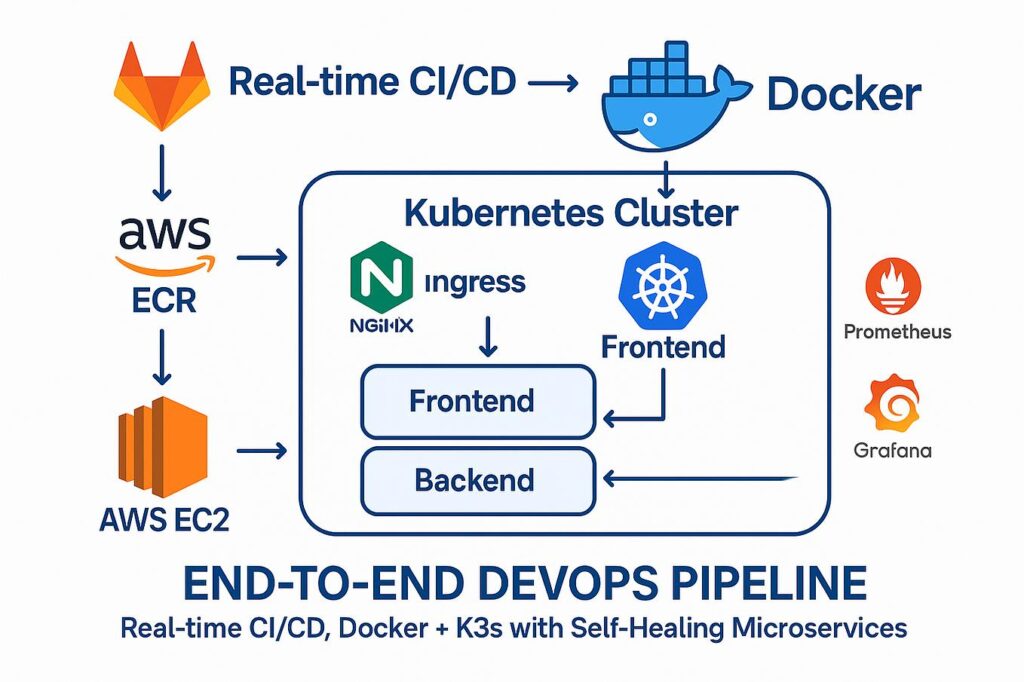
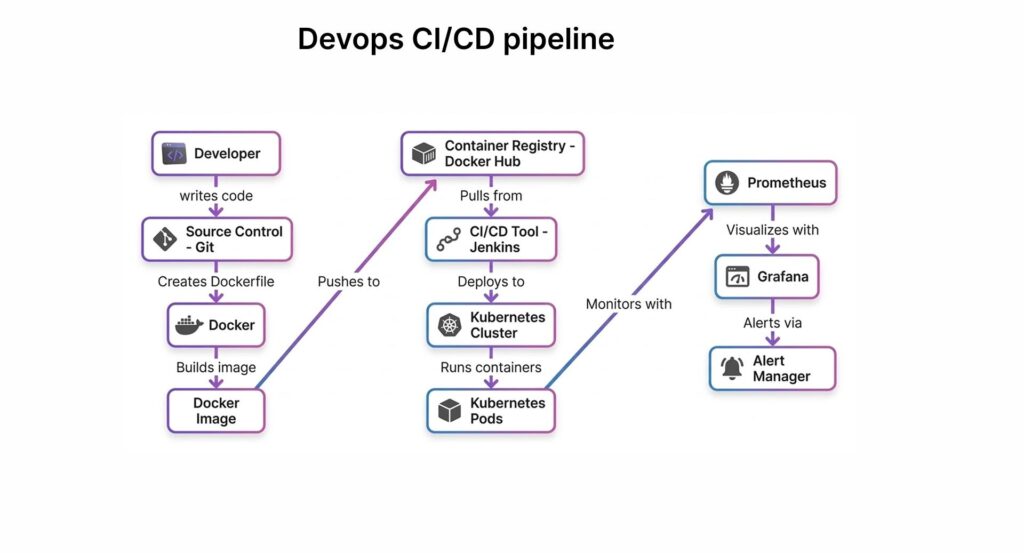
Developer ने code मध्ये change केला की प्रत्येक step manually करण्याऐवजी CI/CD pipeline च्या माध्यमातून अनेक कामं automate करता येतात.
CI मध्ये code changes वारंवार integrate करून automated build आणि tests चालवले जातात. CD त्या changes ला release करण्यासाठी तयार करण्याची किंवा deploy करण्याची प्रक्रिया पुढे नेतो.
DevOps Engineer काय काम करतो?
DevOps Engineer ची भूमिका फक्त server manage करण्यापुरती मर्यादित नसते.
Project आणि company नुसार काम बदलू शकतं, पण सामान्यतः DevOps Engineer खालील गोष्टींवर काम करतो:
- Source code management
- Linux servers
- Cloud infrastructure
- CI/CD pipelines
- Application deployment
- Containerization
- Infrastructure as Code
- Monitoring आणि logging
- Security
- Automation
- Production troubleshooting
- Backup आणि reliability
- Infrastructure scaling
उदाहरणार्थ, एखाद्या कंपनीची Node.js किंवा Python application आहे. Developer ने नवीन feature तयार केला.
DevOps Engineer चं काम असू शकतं:
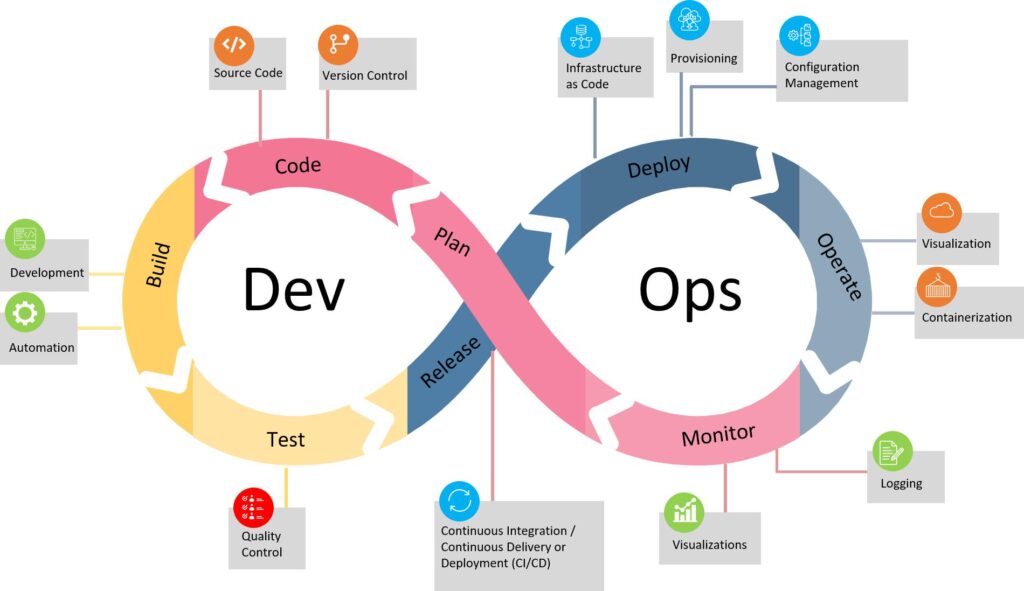
ही process reliable, repeatable आणि शक्य तितकी automated करण्याची जबाबदारी DevOps team घेते.
DevOps Engineer होण्यासाठी Programming येणं आवश्यक आहे का?
हा प्रश्न beginners कडून खूप वेळा विचारला जातो. हो, पण सुरुवातीलाच expert programmer असण्याची गरज नाही.
DevOps मध्ये application developer सारखा मोठा software तयार करण्यापेक्षा automation आणि infrastructure साठी scripting जास्त उपयोगी ठरते. सुरुवातीला खालील गोष्टी समजून घ्या:
- Variables
- Conditions
- Loops
- Functions
- Files
- APIs
- Error handling
- Basic data structures
यानंतर scripting साठी:
- Bash
- Python
यापैकी एक language चांगली पकडली तरी सुरुवातीस पुरेसं आहे.
DevOps Engineer होण्यासाठी Step-by-Step Roadmap
आता सर्वात महत्त्वाचा भाग. जर तुम्ही beginner असाल तर खालील क्रमाने शिकल्यास अनेक tools एकाच वेळी शिकण्याचा गोंधळ कमी होईल.
Step 1: Linux Fundamentals शिका
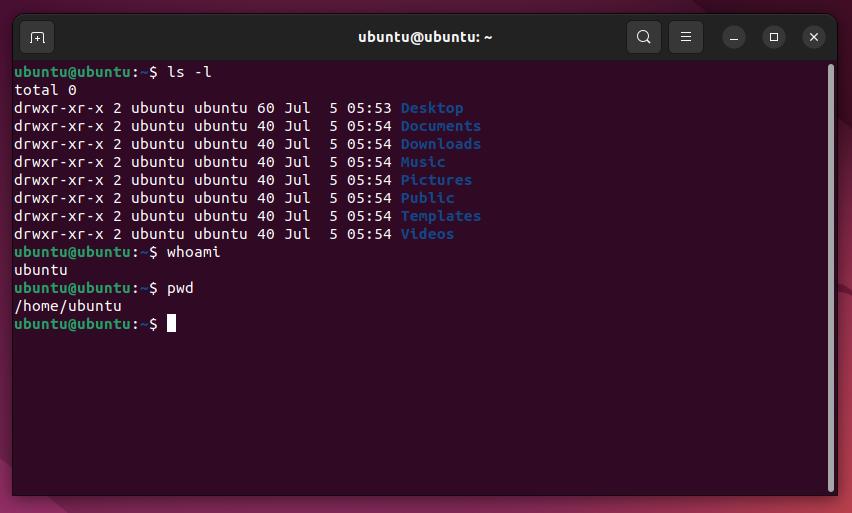
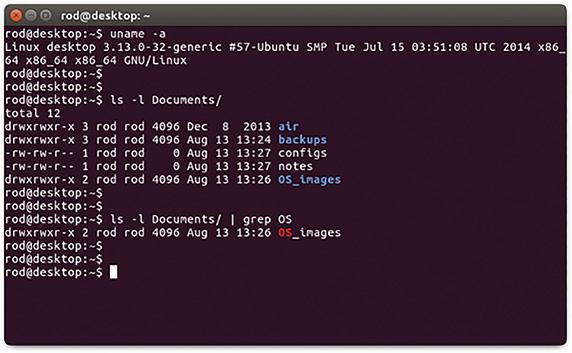
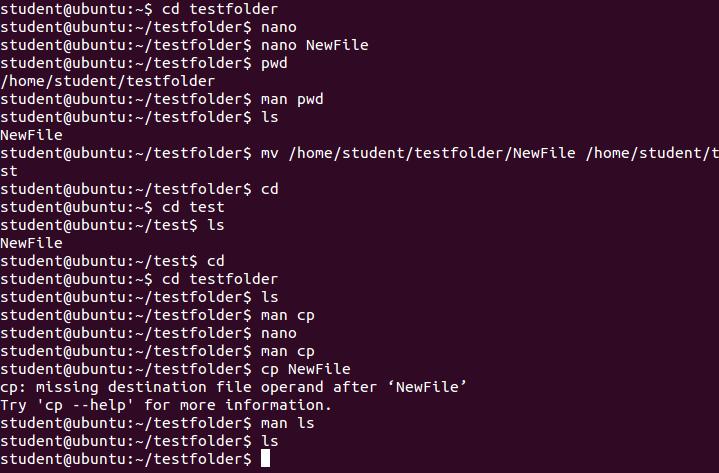
DevOps च्या सुरुवातीला Linux समजून घेणं खूप उपयोगी ठरतं. कारण अनेक applications आणि cloud workloads Linux-based environments मध्ये चालतात.
सुरुवातीला GUI वर अवलंबून न राहता terminal वापरायला शिका.
Basic Linux commands
pwd
ls
cd
mkdir
touch
cp
mv
rm
cat
less
grep
find
यानंतर:
chmod
chown
ps
top
kill
systemctl
journalctl
df
du
free
हे commands फक्त पाठ करू नका. प्रत्येक command कुठे उपयोगी पडतो हे स्वतःच्या Linux machine किंवा VM वर करून पाहा.
Practice Project
एक Linux VM तयार करा आणि:
- नवीन user तयार करा
- permissions बदला
- files आणि directories तयार करा
- एक service install करा
- service start/stop करा
- logs तपासा
- disk आणि memory usage check करा
हा छोटा practice पुढे production troubleshooting मध्ये खूप उपयोगी पडतो.
Step 2: Networking Basics समजून घ्या
DevOps Engineer ला networking चे fundamentals माहिती असणे आवश्यक आहे. सुरुवातीला networking expert होण्याची गरज नाही, पण application request server पर्यंत कशी पोहोचते हे समजलं पाहिजे.
हे topics शिका:
- IP Address
- Private आणि Public IP
- DNS
- Ports
- TCP/IP
- HTTP आणि HTTPS
- SSH
- Firewall
- Proxy
- Load Balancer
- Subnet
- Routing
Step 3: Git आणि GitHub शिका
DevOps मध्ये version control हा अत्यंत महत्त्वाचा भाग आहे.
Git मुळे code मधील changes track करता येतात आणि team मध्ये collaboration करता येते.
सुरुवातीला हे commands व्यवस्थित शिका:
git init
git clone
git status
git add
git commit
git push
git pull
git branch
git merge
git log
git diff
त्यानंतर समजून घ्या:
- Branching
- Pull Request
- Merge
- Merge Conflict
- Tags
.gitignore- Remote repository
Practice
एक छोटा Python किंवा Node.js project GitHub वर ठेवा.
नंतर:
main
 ├── development
 ├── feature/login
 └── feature/payment
अशा branches वापरून changes manage करून पहा.
Step 4: Cloud शिकायला सुरुवात करा
DevOps career मध्ये cloud knowledge खूप महत्त्वाचं आहे. तुम्ही AWS, Azure किंवा Google Cloud यापैकी एखाद्या platform पासून सुरुवात करू शकता.
Beginner साठी एकाच वेळी तीन cloud platforms शिकण्यापेक्षा एक cloud व्यवस्थित समजून घेणं अधिक उपयोगी ठरतं.
AWS निवडल्यास उदाहरणार्थ:
- EC2
- S3
- IAM
- VPC
- Security Groups
- Load Balancer
- Auto Scaling
- CloudWatch
यांचा basic उपयोग समजून घ्या. फक्त console वर क्लिक करून services वापरण्याऐवजी architecture समजून घेण्याचा प्रयत्न करा.
Step 5: Shell Scripting / Python शिका
DevOps मध्ये repetitive कामं automate करण्यासाठी scripting खूप उपयोगी आहे.
उदाहरण:
समजा दररोज server वर log files तयार होतात. जर त्या manually delete कराव्या लागत असतील तर ते automation साठी योग्य काम आहे. Bash किंवा Python वापरून अशी कामं automate करता येतात.
Bash example
#!/bin/bash

echo "Checking disk usage..."

df -h
यापासून सुरुवात करून पुढे:
- Backup scripts
- Log cleanup
- Server health checks
- Deployment scripts
- API automation
अशी scripts तयार करा.
Step 6: Docker शिका
Docker म्हणजे application ला त्याच्या dependencies सहित container मध्ये package करून चालवण्याची पद्धत.
Developer च्या machine वर application चालते पण server वर चालत नाही, अशी समस्या अनेकदा येते.
Containerization मुळे application चं environment अधिक consistent ठेवण्यास मदत होते.
सुरुवातीला हे concepts शिका:
- Image
- Container
- Dockerfile
- Docker Hub
- Volume
- Network
- Port mapping
- Environment variables
- Docker Compose
Basic workflow:
Application Code
      ↓
Dockerfile
      ↓
Docker Image
      ↓
Docker Container
      ↓
Application Running
Practical Project
एक simple web application घ्या आणि:
Source Code
    ↓
Dockerfile
    ↓
Docker Image
    ↓
Container
या पूर्ण process वर स्वतः project करा.
Step 7: CI/CD समजून घ्या
DevOps मधील सर्वात महत्त्वाच्या concepts पैकी CI/CD एक आहे. समजा developer ने GitHub वर code push केला.
आपल्याला प्रत्येक वेळी manually:
- code download
- dependencies install
- tests run
- build
- server वर copy
- application restart
करायचं नसेल. CI/CD pipeline हे काम automate करण्यासाठी वापरता येते. एक basic pipeline अशी दिसू शकते:
Git Push
   ↓
CI Pipeline
   ↓
Build
   ↓
Test
   ↓
Docker Build
   ↓
Push Image
   ↓
Deploy
   ↓
Health Check
GitHub Actions, GitLab CI/CD, Jenkins किंवा cloud-native CI/CD services यापैकी एखाद्या tool पासून सुरुवात करा.
CI/CD चा उद्देश फक्त deployment automate करणे नाही; automated testing, repeatable builds आणि safer releases यासाठीही pipeline महत्त्वाची असते.
Step 8: Infrastructure as Code – Terraform
Cloud console मधून manually server, network आणि इतर resources तयार करण्याऐवजी infrastructure configuration code मध्ये define करता येते.
याला Infrastructure as Code (IaC) म्हणतात. Terraform हे यासाठी widely used tool आहे. उदाहरणार्थ infrastructure मध्ये:
VPC
 ├── Subnet
 ├── Security Group
 ├── Server
 └── Database
हे manually तयार करण्याऐवजी code द्वारे manage करता येते. IaC मुळे infrastructure configuration version control मध्ये ठेवता येते आणि repeatable environments तयार करता येतात.
Terraform मध्ये सुरुवातीला शिका:
- Provider
- Resource
- Variable
- Output
- State
- Module
- Plan
- Apply
- Destroy
Basic workflow
terraform init
terraform plan
terraform apply
terraform destroy
फक्त commands पाठ करण्यापेक्षा एक complete AWS/Azure/GCP infrastructure Terraform ने तयार करण्याचा project करा.
Step 9: Kubernetes शिका – पण Docker नंतर
Beginners ची एक common mistake म्हणजे DevOps सुरू करताच Kubernetes शिकायला सुरुवात करणे. तसं करू नका.
आधी:
Linux
 ↓
Networking
 ↓
Git
 ↓
Cloud
 ↓
Docker
 ↓
CI/CD
हे समजून घ्या. त्यानंतर Kubernetes कडे जा. Kubernetes मध्ये सुरुवातीला:
- Pod
- Deployment
- Service
- Namespace
- ConfigMap
- Secret
- Ingress
- Volume
- Replica
- Scaling
हे concepts समजून घ्या.
नंतर:
- Helm
- Kubernetes networking
- Persistent storage
- Rolling updates
- Troubleshooting
याकडे जा.
Step 10: Monitoring आणि Logging शिका
Application production मध्ये deploy केली म्हणजे DevOps Engineer चं काम संपत नाही. आता प्रश्न असतो:
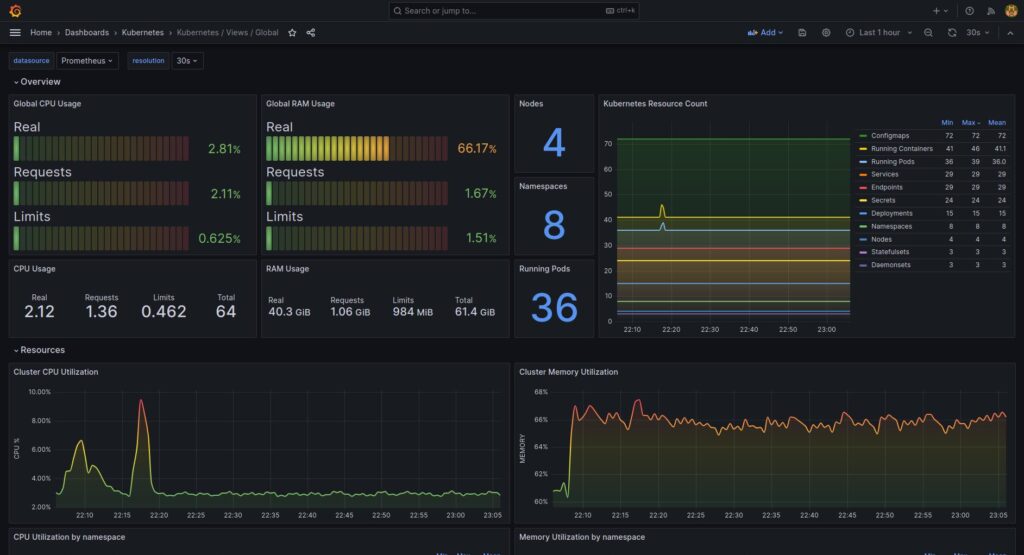
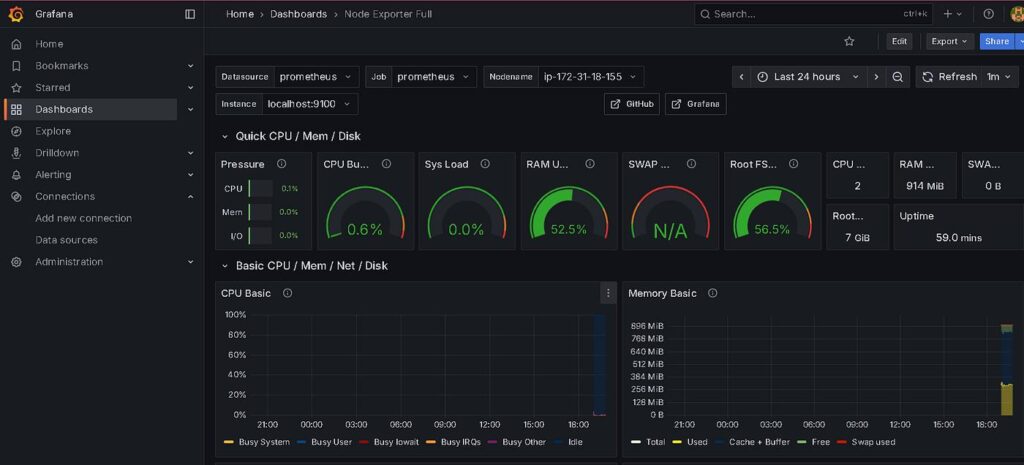
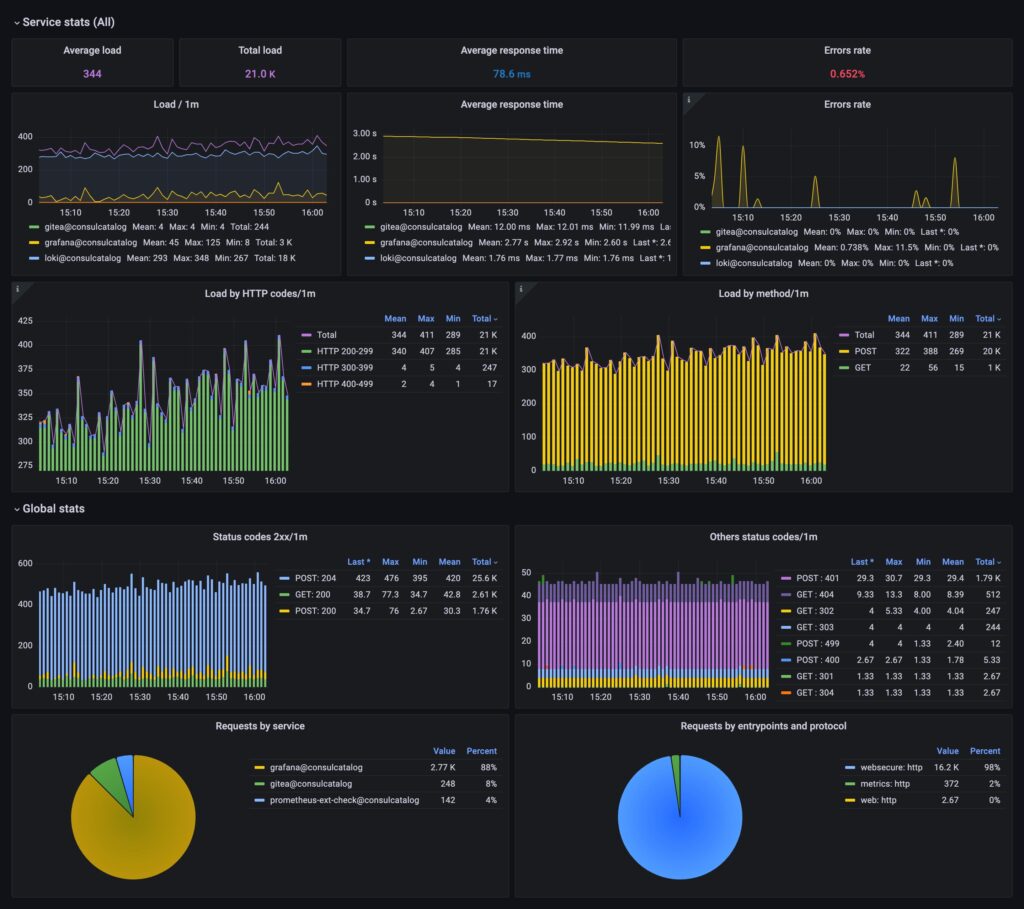
Application व्यवस्थित चालते आहे का?
उदाहरणार्थ:
- CPU किती वापरला जातो?
- Memory किती आहे?
- Application किती requests handle करत आहे?
- Error rate वाढली आहे का?
- Server down आहे का?
- Response time वाढला आहे का?
यासाठी monitoring आणि observability आवश्यक आहे.
Common tools:
- Prometheus
- Grafana
- ELK / Elastic Stack
- CloudWatch
- Cloud Monitoring
Monitoring चा उद्देश फक्त dashboard तयार करणं नाही. Production system मध्ये काय होतंय हे समजून issue शोधण्यासाठी logs, metrics आणि traces उपयोगी पडतात.
Step 11: DevSecOps Basics शिका
आजच्या DevOps environment मध्ये security शेवटी add करण्यापेक्षा development आणि deployment process मध्येच consider करणं महत्त्वाचं आहे.
तुम्हाला कमीतकमी हे concepts समजले पाहिजेत:
- Secrets management
- IAM
- Least privilege
- SSH security
- Dependency vulnerabilities
- Container image scanning
- HTTPS
- Secure CI/CD
- Access control
विशेषतः GitHub repository मध्ये passwords, API keys किंवा cloud credentials commit करू नका. CI/CD pipeline आणि त्यातील credentials सुरक्षित ठेवणे DevOps चा महत्त्वाचा भाग आहे.
DevOps Engineer होण्यासाठी कोणते Tools शिकावे?
सुरुवातीला tool list पाहून घाबरू नका. तुमचा roadmap असा ठेवू शकता:
| Area | Tools / Technology |
|---|---|
| Operating System | Linux |
| Version Control | Git, GitHub |
| Scripting | Bash, Python |
| Cloud | AWS / Azure / GCP |
| Containers | Docker |
| CI/CD | GitHub Actions / Jenkins / GitLab CI |
| IaC | Terraform |
| Orchestration | Kubernetes |
| Monitoring | Prometheus, Grafana |
| Logging | ELK / Cloud Logging |
| Configuration | Ansible |
| Security | IAM, Secrets, Scanning |
सगळे tools एकाच वेळी शिकण्याची गरज नाही.
Concept → Tool → Practice → Project
या क्रमाने शिका.
DevOps शिकण्यासाठी योग्य Order कोणता?
जर तुम्ही अगदी beginner असाल तर हा roadmap practical आहे:
1. Linux
      ↓
2. Networking
      ↓
3. Git & GitHub
      ↓
4. Bash / Python
      ↓
5. Cloud Basics
      ↓
6. Docker
      ↓
7. CI/CD
      ↓
8. Terraform
      ↓
9. Kubernetes
      ↓
10. Monitoring & Logging
      ↓
11. DevSecOps
      ↓
12. Real Projects
हा order फक्त tools ची sequence नाही. प्रत्येक पुढचा topic आधीच्या concept वर build होईल अशा पद्धतीने शिकण्याचा प्रयत्न करा.
DevOps Engineer होण्यासाठी Projects का आवश्यक आहेत?
फक्त tutorials पाहून किंवा commands पाठ करून DevOps Engineer होता येत नाही.
तुम्ही काम करून पाहिलं पाहिजे.
Resume मध्ये:
“I know Docker, Jenkins, AWS and Kubernetes.”
असं लिहिण्यापेक्षा:
“I built a CI/CD pipeline that builds a Docker image, pushes it to a registry and deploys the application to a cloud server.”
हे अधिक meaningful आहे.
Beginner साठी 5 Practical DevOps Projects
Project 1: Linux Server Setup
एक Linux server तयार करा.
त्यावर:
- Nginx install करा
- User तयार करा
- SSH configure करा
- Firewall configure करा
- Website host करा
- Logs तपासा
Project 2: Dockerize a Web Application
एक Python/Node.js application घ्या.
Source Code
 ↓
Dockerfile
 ↓
Docker Image
 ↓
Docker Container
Application Docker मध्ये चालवा.
Project 3: CI/CD Pipeline
GitHub वर application ठेवा. Pipeline तयार करा:
Git Push
 ↓
Build
 ↓
Test
 ↓
Docker Build
 ↓
Docker Registry
 ↓
Deploy
आता प्रत्येक code push नंतर deployment process automate करून पहा.
Project 4: Terraform Cloud Infrastructure
Terraform वापरून cloud infrastructure तयार करा.
उदाहरण:
Terraform
   ↓
Network
   ↓
Server
   ↓
Security
   ↓
Application
नंतर infrastructure destroy करून पुन्हा create करा.
यामुळे IaC चा खरा फायदा समजतो.
Project 5: Kubernetes Deployment
Docker image Kubernetes cluster वर deploy करा.
Developer
   ↓
GitHub
   ↓
CI/CD
   ↓
Docker Image
   ↓
Kubernetes
   ↓
Application
   ↓
Monitoring
हा project portfolio मध्ये दाखवण्यासाठीही चांगला आहे.
DevOps शिकताना फक्त Tools वर Focus करू नका
DevOps मध्ये एक common mistake म्हणजे:
आज Docker
उद्या Jenkins
परवा Kubernetes
नंतर Terraform
असं करून प्रत्येक tool ची basic माहिती घेणं.
पण काही महिन्यांनी:
“Docker वापरलं होतं, पण नेमकं का वापरलं होतं?”
अशी परिस्थिती निर्माण होऊ शकते.
त्याऐवजी एक application घ्या आणि तिचा पूर्ण lifecycle समजून घ्या.
Code
 ↓
Git
 ↓
Build
 ↓
Test
 ↓
Container
 ↓
CI/CD
 ↓
Cloud
 ↓
Infrastructure as Code
 ↓
Deploy
 ↓
Monitor
 ↓
Troubleshoot
DevOps समजण्याचा हा approach जास्त practical आहे.
DevOps Engineer ला कोणत्या Problems Solve करता आल्या पाहिजेत?
Job-ready होण्यासाठी स्वतःला हे प्रश्न विचारा:
1. Application server वर चालत नाही. काय तपासाल?
- Application logs
- Process
- Port
- Environment variables
- Dependencies
- Network
- Firewall
2. Deployment fail झाला तर?
- Pipeline logs
- Build errors
- Test failures
- Docker image
- Deployment configuration
- Server logs
3. Website अचानक slow झाली तर?
- CPU
- Memory
- Disk
- Network
- Application logs
- Database
- Traffic
- Response time
4. Docker container लगेच बंद झाला तर?
Container logs, process आणि configuration तपासा.
5. Server disk full झाली तर?
Disk usage identify करा, logs आणि unnecessary files तपासा आणि root cause समजून घ्या.
DevOps मध्ये tool माहितीपेक्षा troubleshooting mindset खूप महत्त्वाचा आहे.
DevOps Engineer साठी Resume मध्ये काय दाखवावे?
Resume मध्ये फक्त tools ची मोठी list देऊ नका.
उदाहरण:
Weak
Skills:
AWS, Docker, Kubernetes, Jenkins, Terraform
Better:
Project:
Built a CI/CD pipeline for a Dockerized web application.

- Source code managed using GitHub
- Automated build and testing
- Docker image created through pipeline
- Image pushed to container registry
- Application deployed to cloud infrastructure
- Infrastructure provisioned using Terraform
- Application monitored using monitoring tools
यामुळे interviewer ला तुम्ही tools कुठे आणि का वापरले हे समजतं.
DevOps Interview साठी काय तयारी करावी?
Interview साठी फक्त definitions पाठ करू नका. Concept-based questions ची तयारी करा.
उदाहरण:
- Docker container आणि VM मध्ये फरक काय?
- CI आणि CD मध्ये फरक काय?
- Git branch का वापरतो?
- Dockerfile कशासाठी?
- Kubernetes Pod म्हणजे काय?
- Load Balancer का वापरतो?
- Terraform state म्हणजे काय?
- CI/CD pipeline fail झाली तर troubleshooting कशी कराल?
- Linux server ची disk full झाली तर काय कराल?
- Application production मध्ये deploy केल्यानंतर monitoring कशी कराल?
- Secrets GitHub मध्ये का ठेवू नयेत?
अशा questions चं उत्तर real example सहित देता आलं तर तुमची तयारी जास्त मजबूत होते.
DevOps Engineer होण्यासाठी किती वेळ लागतो?
याचं एक fixed answer नाही. तुमच्या programming, Linux आणि cloud knowledge वर ते अवलंबून आहे. पण learning ला अशा phases मध्ये divide करू शकता:
Phase 1 – Fundamentals
Linux + Networking + Git
Phase 2 – Automation
Bash/Python + Cloud
Phase 3 – Deployment
Docker + CI/CD
Phase 4 – Infrastructure
Terraform + Cloud Architecture
Phase 5 – Production
Kubernetes + Monitoring + Security
Phase 6 – Job Preparation
Projects + Resume + GitHub + Interview Preparation, वेगापेक्षा hands-on practice महत्त्वाची आहे.
DevOps शिकण्यासाठी माझा Practical Advice
जर तुम्ही आजपासून DevOps शिकायला सुरुवात करत असाल तर एकदम 15 tools install करू नका. एक simple application घ्या.
उदाहरणार्थ:
Python Web App
आणि त्यावर काम करा.
Week-by-week approach
- Week 1: Linux + Networking
- Week 2: Git + GitHub + Bash
- Week 3: Cloud Basics
- Week 4: Docker
- Week 5: CI/CD
- Week 6: Terraform
- Week 7: Kubernetes Basics
- Week 8: Monitoring + Security
त्यानंतर एक end-to-end DevOps project तयार करा. Learning दरम्यान प्रत्येक topic साठी स्वतःला एक प्रश्न विचारा:
“हे real project मध्ये कुठे वापरणार?”
हा प्रश्न तुम्हाला tool शिकण्यापेक्षा DevOps समजायला मदत करेल.
DevOps Engineer बनण्यासाठी Degree आवश्यक आहे का?
DevOps career साठी Computer Science किंवा IT degree काही companies मध्ये उपयोगी ठरू शकते, पण DevOps skills फक्त degree मधून येत नाहीत.
तुमच्याकडे practical understanding असणं महत्त्वाचं आहे:
- Linux
- Networking
- Cloud
- Git
- Docker
- CI/CD
- IaC
- Kubernetes
- Monitoring
- Security
- Troubleshooting
तुमच्या GitHub वर projects, documentation आणि hands-on work दाखवता आला तर ते तुमच्या learning चा मजबूत पुरावा ठरू शकतो
DevOps मध्ये Career Growth
DevOps मध्ये पुढे अनेक दिशांनी career वाढवता येतो.
उदाहरण:
Junior DevOps Engineer
        ↓
DevOps Engineer
        ↓
Senior DevOps Engineer
        ↓
DevOps / Platform Engineer
        ↓
Cloud / Infrastructure Architect
तसंच अनुभव आणि आवडीनुसार:
- SRE
- Platform Engineering
- Cloud Engineering
- DevSecOps
- Infrastructure Engineering
या क्षेत्रांकडेही जाता येतं.
शेवटी एक महत्त्वाची गोष्ट
DevOps शिकताना सर्वात मोठी चूक म्हणजे tools च्या मागे धावणे. Docker, Kubernetes, Jenkins, Terraform, AWS ही tools आहेत.
पण DevOps ची खरी value आहे:
Automation + Reliability + Collaboration + Fast and Safe Delivery + Monitoring + Continuous Improvement
Modern DevOps practices मध्ये continuous integration, continuous delivery, automated testing, deployment automation, monitoring/observability, infrastructure as code आणि security यांसारख्या capabilities महत्त्वाच्या मानल्या जातात.
म्हणून सुरुवात अशी करा:
Linux
 ↓
Networking
 ↓
Git
 ↓
Cloud
 ↓
Docker
 ↓
CI/CD
 ↓
Terraform
 ↓
Kubernetes
 ↓
Monitoring
 ↓
Security
 ↓
Real Projects
प्रत्येक technology शिकताना स्वतःचा छोटा project करा.
Tutorial पाहिला → स्वतः करून पाहिलं → Error आला → Error शोधला → Fix केला → पुन्हा deploy केलं
यातूनच खरा DevOps अनुभव तयार होतो.
जर तुम्ही beginner असाल, तर सगळं एकाच महिन्यात शिकण्याचा pressure घेऊ नका. एक concept नीट समजून घ्या, त्यावर हाताने practice करा आणि मग पुढच्या concept कडे जा.
DevOps Engineer होण्यासाठी सर्वात महत्त्वाचं म्हणजे tools ची संख्या नाही; तुम्हाला production problem समजून घेऊन ती व्यवस्थित solve करता येते का, हे आहे.
Code ते Production – कसा प्रवास होतो? | CI/CD Pipeline समजून घ्या
DevOps मधील सर्वात महत्त्वाची concept म्हणजे CI/CD Pipeline. Code लिहिल्यापासून ते user पर्यंत पोहोचण्याचा हा automated प्रवास आहे:

DevOps म्हणजे फक्त tools नाही — ती एक culture आहे जिथे developers आणि operations एकत्र काम करतात, जलद deliver करतात आणि चुकांमधून शिकतात.
DevOps Engineer ला कोणते Tools शिकायचे?
खाली दिलेले tools शिकल्यास तुम्ही कोणत्याही IT company मध्ये DevOps job मिळवू शकता.

DevOps Engineer ला किती पगार मिळतो?
भारतात DevOps Engineers ला खूप चांगला पगार मिळतो. Experience वाढल्यावर salary झपाट्याने वाढते.
| Experience | Job Title | Salary (Per Year) | Top Cities |
|---|---|---|---|
| 0–1 वर्ष | Junior DevOps Engineer | ₹4–8 LPA | Pune, Bangalore |
| 1–3 वर्षे | DevOps Engineer | ₹8–15 LPA | Hyderabad, Mumbai |
| 3–6 वर्षे | Senior DevOps Engineer | ₹15–25 LPA | Bangalore, Delhi |
| 6+ वर्षे | DevOps Architect / Lead | ₹25–50 LPA | Pan India + Remote |
💡 Pune साठी खास: Pune हे Maharashtra चे IT hub आहे. Infosys, TCS, Cognizant, Wipro आणि अनेक startups Pune मध्ये DevOps Engineers hire करतात. Freshers ला ₹4–6 LPA सुरुवात होते.
जलद Grow होण्यासाठी 6 महत्त्वाच्या गोष्टी
- Projects बनवा: GitHub वर real projects टाका — CI/CD pipeline, Docker setup, Kubernetes cluster. Portfolio महत्त्वाचे आहे.
- Certifications घ्या: AWS Certified DevOps Engineer, CKA (Kubernetes), Terraform Associate – हे certificates resume ला value देतात.
- Community Join व्हा: DevOps Pune meetups, CNCF India, LinkedIn groups — networking केल्याने job opportunities येतात.
- Daily Practice करा: रोज 1–2 तास Linux terminal वापरा, GitHub वर code push करा. Consistency हाच success चा मार्ग आहे.
- Free Resources वापरा: KodeKloud, FreeCodeCamp, TechWorld with Nana YouTube channel — हे सगळे free आणि excellent आहेत.
- Open Source Contribute करा: GitHub वर open source projects मध्ये contribute केल्याने experience आणि visibility दोन्ही मिळतात.
नेहमी विचारले जाणारे प्रश्न | Frequently Asked Questions
Q1. DevOps शिकण्यासाठी programming येणे आवश्यक आहे का?
Ans: पूर्ण programming expert असणे आवश्यक नाही, पण Python किंवा Bash scripting चे basic knowledge असणे खूप उपयुक्त आहे. Scripting automated tasks साठी वापरली जाते.
Q2. 10वी / 12वी नंतर DevOps शिकता येते का?
Ans: हो! Degree नसली तरी certifications आणि portfolio च्या जोरावर job मिळवता येते. AWS, CKA certifications industry मध्ये highly respected आहेत.
Q3. DevOps Engineer आणि Software Developer मध्ये फरक काय?
Ans: Software Developer application चा code लिहितो. DevOps Engineer तो code automatically build, test, आणि deploy करण्याची system बनवतो. DevOps हे infrastructure आणि automation वर focus करते.
Q4. कोणते Cloud Platform शिकावे — AWS, Azure की GCP?
Ans: AWS सर्वात जास्त वापरले जाते आणि job market मध्ये AWS skills ला जास्त demand आहे. सुरुवात AWS ने करा. एकदा concepts clear झाल्यावर Azure किंवा GCP शिकणे सोपे जाते.
Q5. Pune मध्ये DevOps jobs कुठे शोधाव्यात?
Ans: LinkedIn, Naukri.com, Indeed वर “DevOps Engineer Pune” search करा. Infosys BPM, Persistent Systems, Endava, Capgemini Pune मध्ये DevOps hiring करतात. Freshers साठी internships पण उपलब्ध असतात.
पुढे काय शिकाल?